Problems found before staff notice
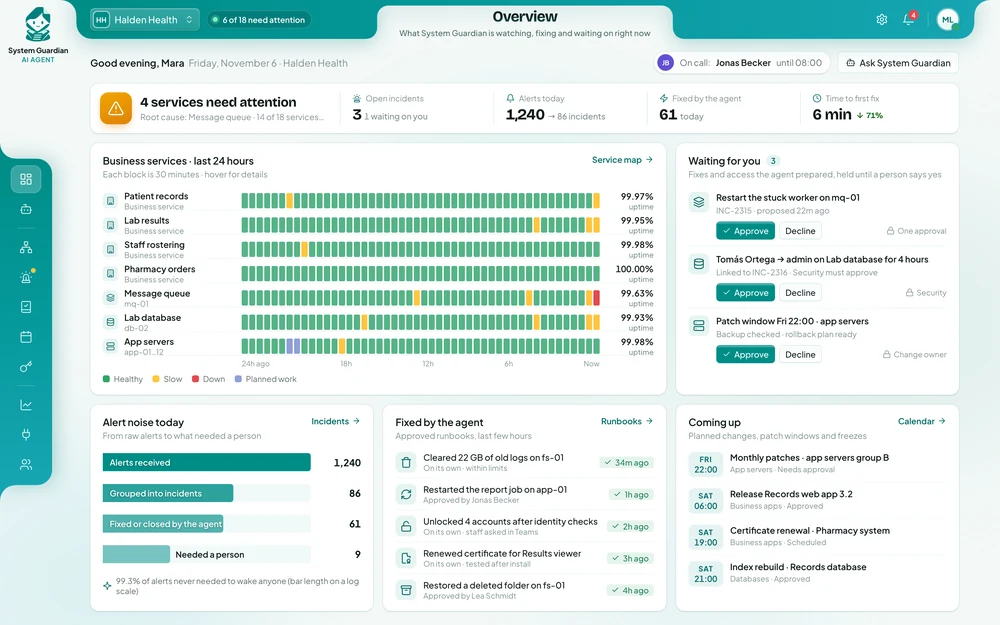
Alerts from your monitoring tools, internal services and server logs are read as they arrive, so slowdowns are caught before employees start reporting them.
 System Guardian AI Agent
 watches your systems day and night, groups alerts into one incident and brings the likely cause to the right engineer. Your IT team fixes problems faster and is woken less often, and every change to your systems still needs your people’s approval.
−45%
time to find the cause of a problem
1
incident instead of 40 separate alerts
−70%
night-time interruptions for the on-duty engineer
Alerts from your monitoring tools, internal services and server logs are read as they arrive, so slowdowns are caught before employees start reporting them.
Recent changes, logs and your asset inventory are checked first, so the engineer on duty begins with the likely cause instead of a blank page.
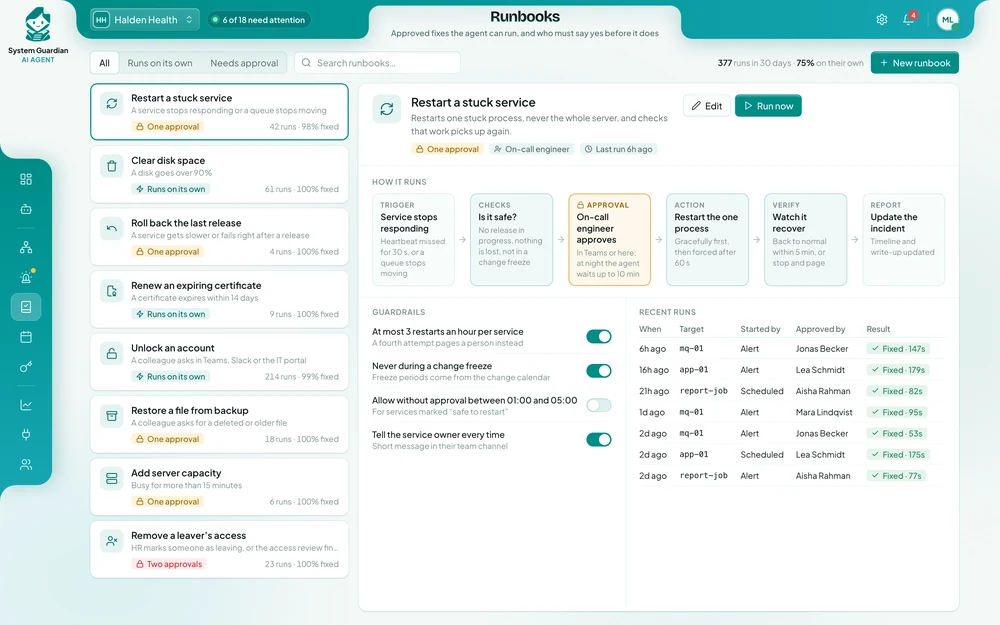
Restarts, disk clean-ups and other routine fixes run within the limits you set. Anything bigger waits for an engineer to approve.
The timeline is written as it happens, the write-up is drafted by morning and follow-up tasks go into Jira, so the same problem does not come back.
An IT operations engineer asks one question. The agent reads the server logs and recent changes, opens an incident and alerts the engineer on duty. The engineer decides whether to roll the change back.
IT operations engineerWhy is the invoicing service slow this morning?
System GuardianResponse times rose at 08:12, right after a configuration change went live. Server logs show database timeouts. I’ve opened incident INC-2207, alerted the on-duty engineer and suggested rolling the change back.
Each one in short: the problem, the results, and how the agent handles the work.
When something stalled at night, the on-call engineer was woken by dozens of separate alerts, had to sign in from home, search the logs and work out which of them mattered.
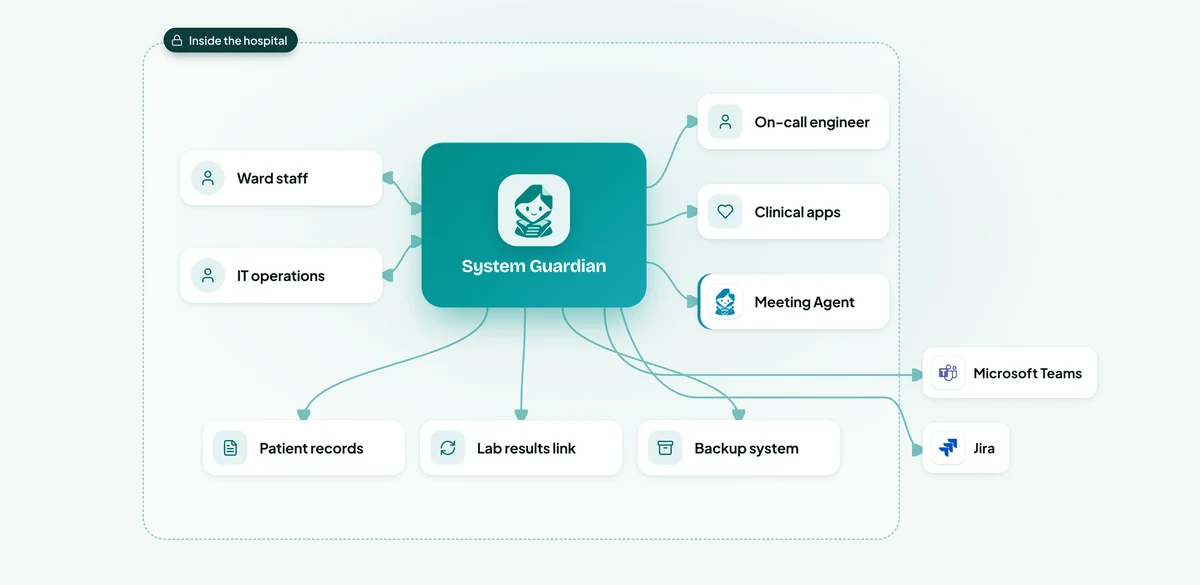
System Guardian checks the patient records system, the lab results link, internal servers and the nightly backup, and knows what a normal night looks like for each of them.
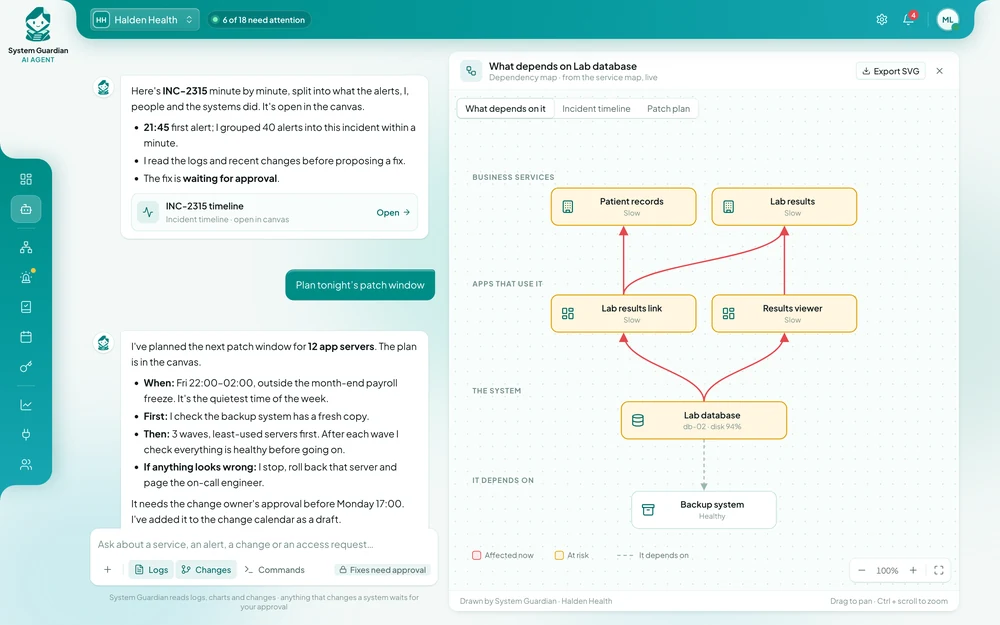
When the lab results link stalled at 02:40, it grouped 48 alerts from different servers into one incident and read the logs to find the cause: a stuck message queue with 1,284 results waiting.
Restarting that queue is a step the team had approved in advance, so the agent ran it, checked that results were reaching the wards again, and stopped there.
The on-call engineer got one short message in Microsoft Teams instead of 48 alerts.
Access lived in four places: the identity directory, Okta, the core banking system's own user list and a handful of file shares and server admin groups.
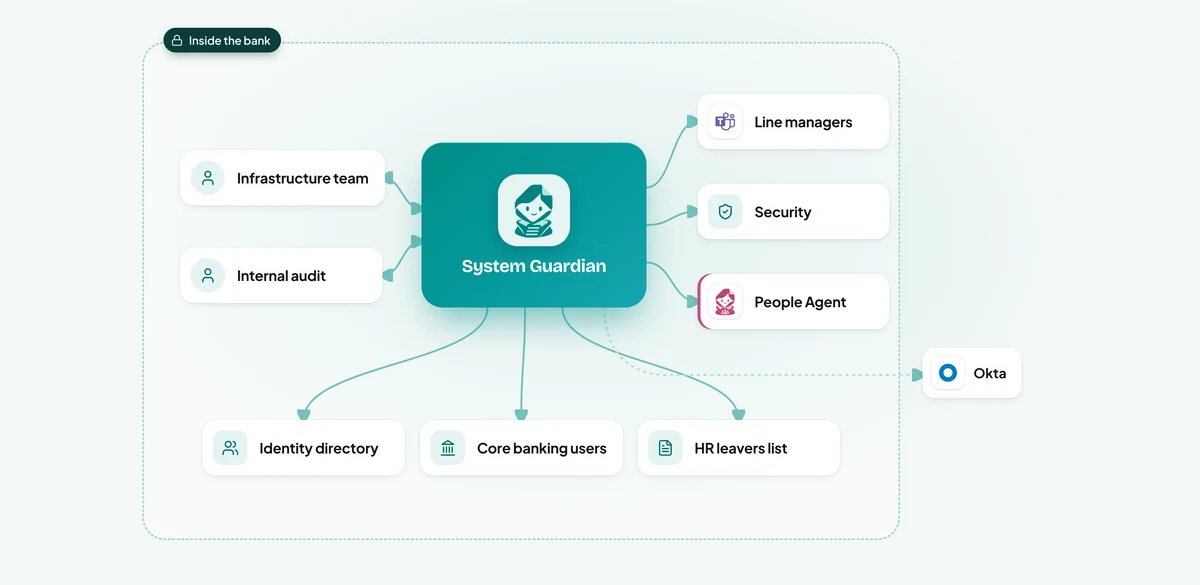
System Guardian reads the identity directory, Okta, the core banking users and the HR leavers list, and builds one picture of who has access to what, instead of a quarterly export.
It highlights people who have left but are still active, contractors whose contracts ended, accounts unused for 90 days or more and admin rights a person's current role doesn't need.
Each manager gets a short list in Microsoft Teams with the reason for every item, and decides Keep or Remove.
Only after a manager signs off does the agent remove the access, using the steps the team approved.
In the previous year's sale, a release slowed down the payment step.
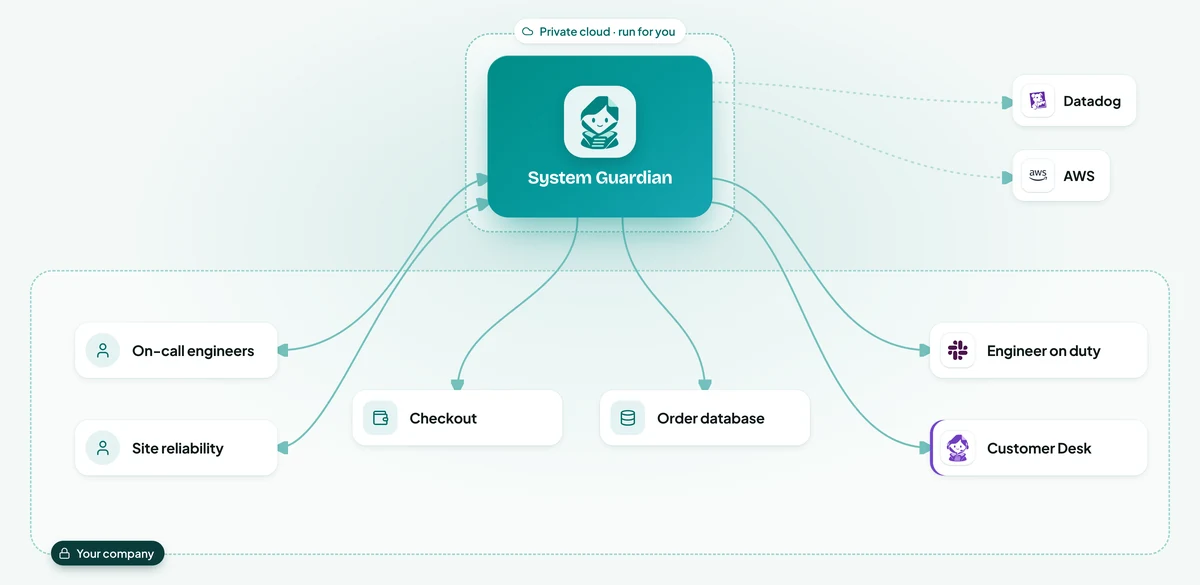
System Guardian reads Datadog and Grafana for every part of checkout, so it sees a slow payment step as a checkout problem, not as dozens of separate alerts.
When the cache disk reached 95% at 10:12, it cleared expired items before pages slowed.
At 14:05 the payment step slowed from 0.4 to 2.8 seconds right after release 4.18.
The agent rolled back through the team's usual release steps in GitHub, watched checkout for ten minutes to confirm it was back to normal, and drafted the write-up for the next morning.
Patching a line's servers while it runs can stop production, so the IT team waited for weekend shutdowns.
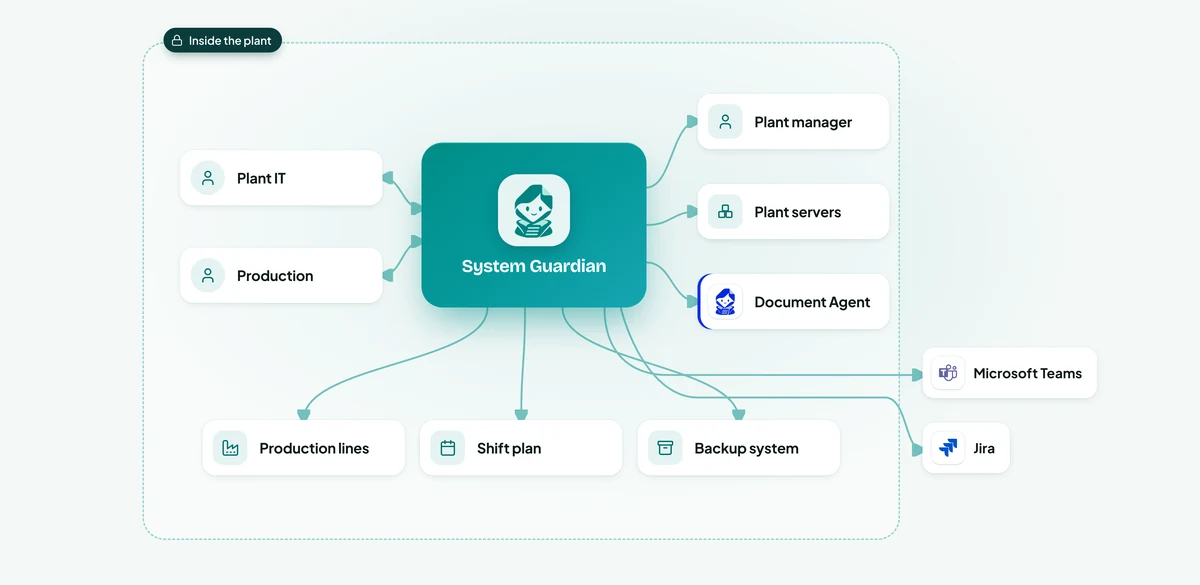
When a security fix is released, the agent checks the asset register for affected servers and the shift plan for the next planned stops, such as cleaning breaks and shift changes.
It proposes one window per line in Microsoft Teams, with the servers, the expected time and the backup status.
Before starting, it confirms the backup system holds a fresh copy and the line is really stopped.
The agent waits until the production line system reports the line ready, posts progress to Teams, logs the change in Jira and only then moves to the next line.
In the first week of term, the desk's queue grew to over two days.
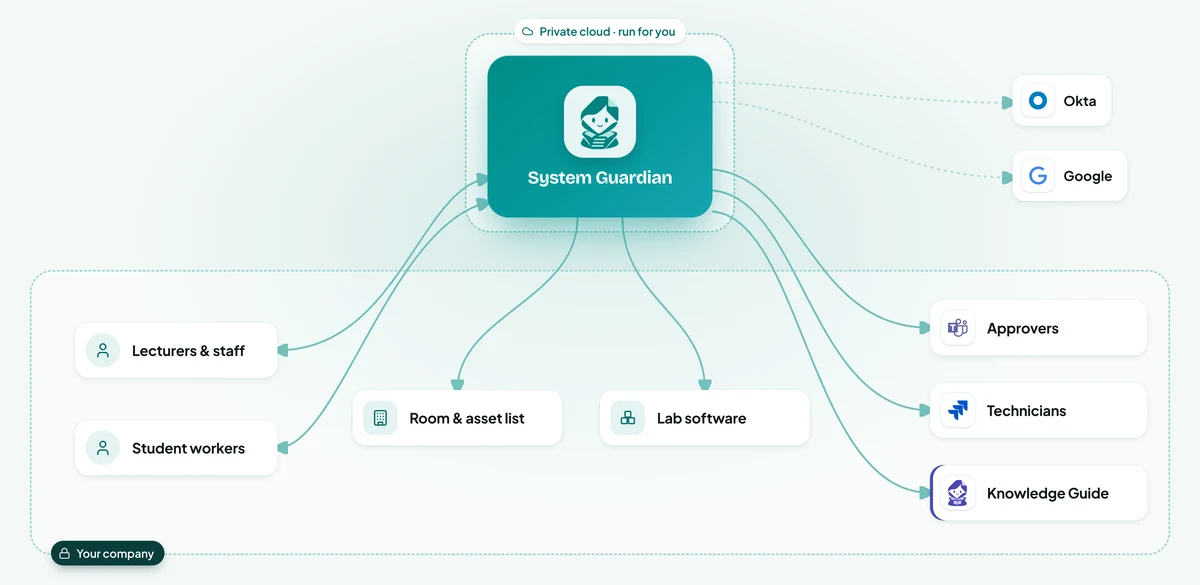
The agent confirms the person in Okta: their department, role and start date.
Account unlocks, password resets, standard lab software and course drives are done in under a minute, within the rules the desk agreed, and logged.
Admin rights, research data and anything outside the rules go to the person who owns that decision, in Teams, with the reason and what the person's colleagues already have.
A broken projector or lab PC becomes a Jira ticket with the room, the asset and what has already been tried, so the technician arrives with the right part.
One failing database could set off two hundred alerts, and each could page the on-call engineer.
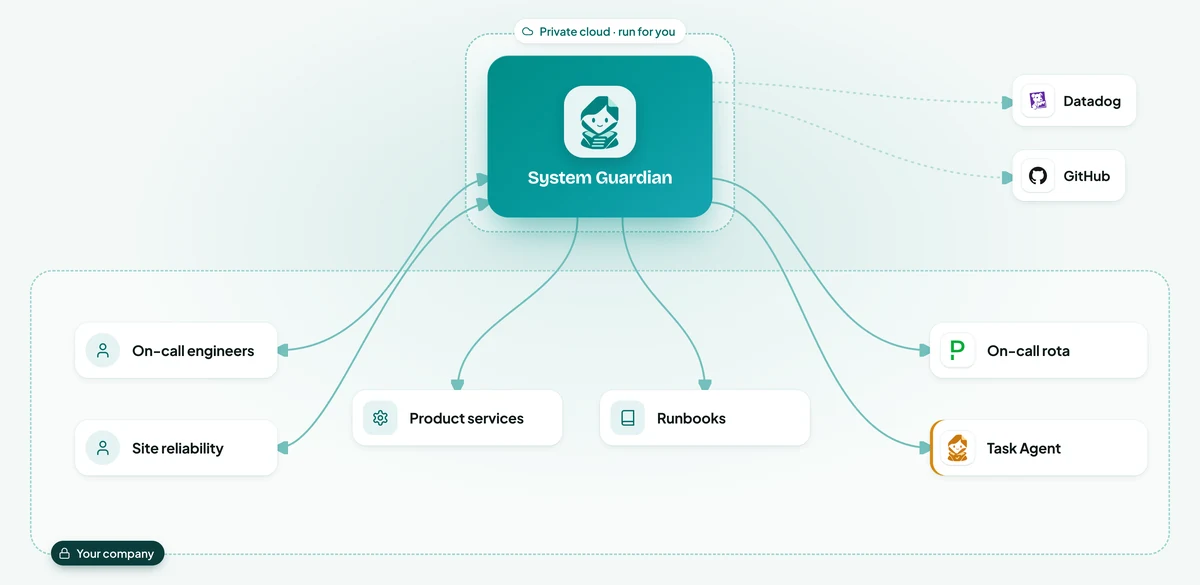
Alerts that share a cause, such as every service that depends on one slow database, become one problem with one owner instead of hundreds of pages.
For each problem it looks at recent releases in GitHub, new error reports in Sentry and the service's charts in Datadog, and writes a short summary of what it found.
If an approved runbook matches, such as restarting a stuck worker, it runs it and confirms the service recovered.
After a real incident, it drafts the review from the Slack thread, the release history and the charts: timeline, cause and follow-ups, created as Jira tasks once the engineer approves.
Illustrative scenarios with unnamed companies. The figures show the kind of improvement each setup is designed to deliver; actual results depend on volume, the systems connected and how the agent is configured.
We set up the System Guardian AI Agent around how your IT operations team works today.
Week 1
We sit with the people who do the work, map the process step by step and find the systems that hold the information. You get a written plan before anything is built.
Weeks 2 to 3
We build and configure the agent around your process: your rules, your approvals, your wording, and connections to your databases and the tools your teams use.
Weeks 3 to 4
We install it inside your infrastructure, or in our cloud if you prefer, and test it with your team on real requests until the results meet the standard you set.
From week 5
We train your employees and administrators, hand over the controls and stay with you: monthly reviews, updates you approve, and the next process when you are ready.
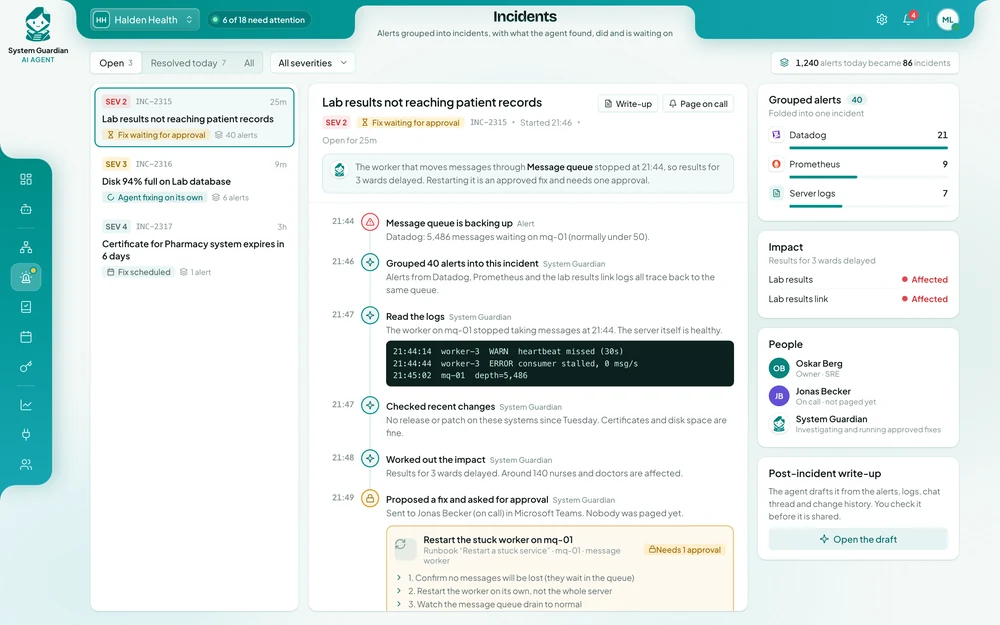
Your team sees alerts grouped into incidents within the first weeks. Most companies see fewer interruptions and faster fixes during the first month after going live.
It depends on how many systems it watches, the tools it connects to and where it runs. After a first conversation you get a written proposal with the price, so you can compare it with what outages and night work cost you today.
No. It takes the first look at every alert and runs the routine fixes you approved, so your engineers are woken less often and spend their time on the problems that need them.
Every finding comes with the alerts, log lines and changes behind it, so an engineer can check it in a minute. Anything outside the steps you approved is only a suggestion, and every action is recorded.
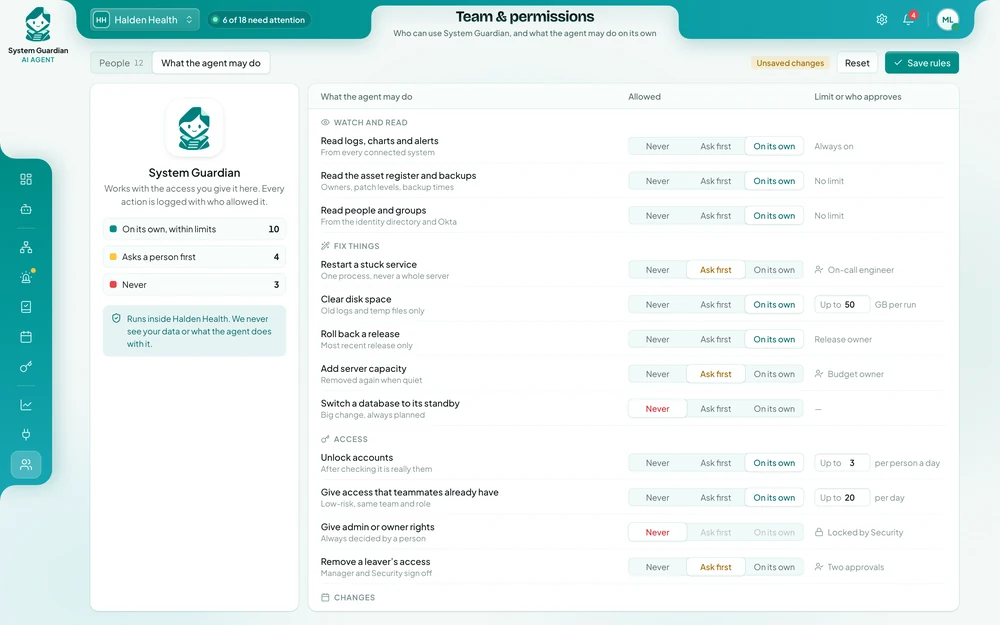
Yes. For each action you decide whether it is never allowed, needs a person first or may run alone within a limit. You can pause it at any time.
Yes. It can run on your own servers, together with its AI models, so logs, access lists and system details stay inside your company, no outside AI service is used and we have no access to them.
No. It reads Datadog, Grafana, Sentry and your own server logs, works with PagerDuty, Opsgenie, GitHub, GitLab and Jira, and posts in Slack or Microsoft Teams.
Only the actions you approve in advance, such as restarting a stuck service. Everything else is suggested to an engineer first, and big changes are never made without a person.
One person who knows how incidents are handled today, read access to the tools and logs involved, your existing fix procedures, and a few hours a week from the team while we test.
Yes. Most companies start with a few important services and let the agent only watch and suggest, then allow routine fixes once the team trusts the results.
Tell us which systems matter most, how many alerts your team receives and where incidents take the longest. You get a written proposal with the expected results, the setup, a timeline and a price.