More hours with customers, fewer in the CRM
Emails, meetings and next steps are logged in Salesforce, HubSpot or Zoho for your reps, so the pipeline stays current without evening admin.
 Sales AI Agent
 prepares every meeting, drafts quotes from your own price lists and keeps the CRM up to date, so your reps spend their time selling instead of on admin. Discounts above your limits still go to a manager, and customer messages are sent by your people unless you decide otherwise.
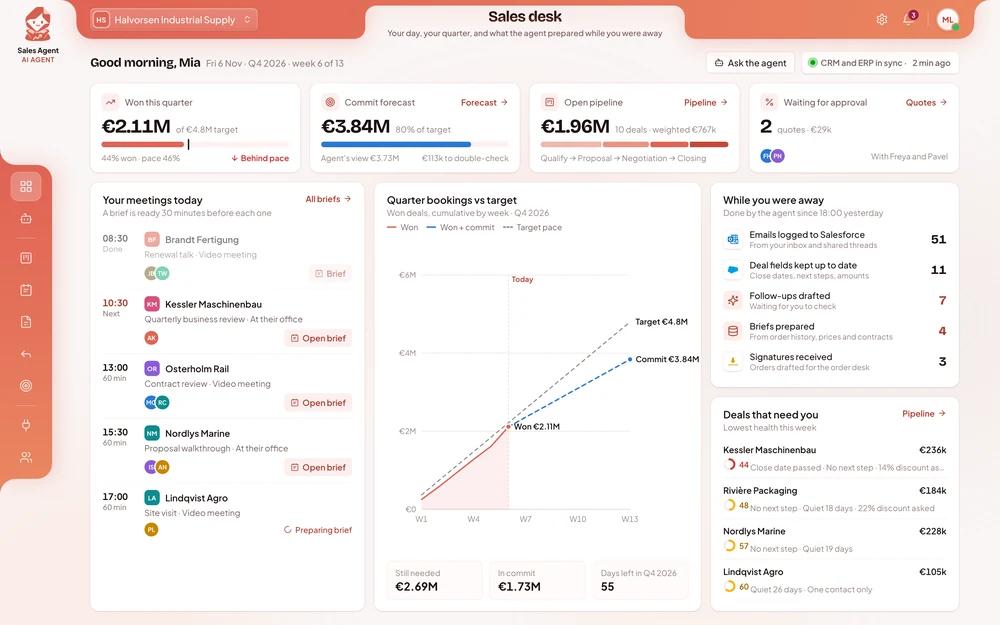
+5 h
per rep per week back for selling
100%
of meetings logged in the CRM
−50%
time to send a quote
Emails, meetings and next steps are logged in Salesforce, HubSpot or Zoho for your reps, so the pipeline stays current without evening admin.
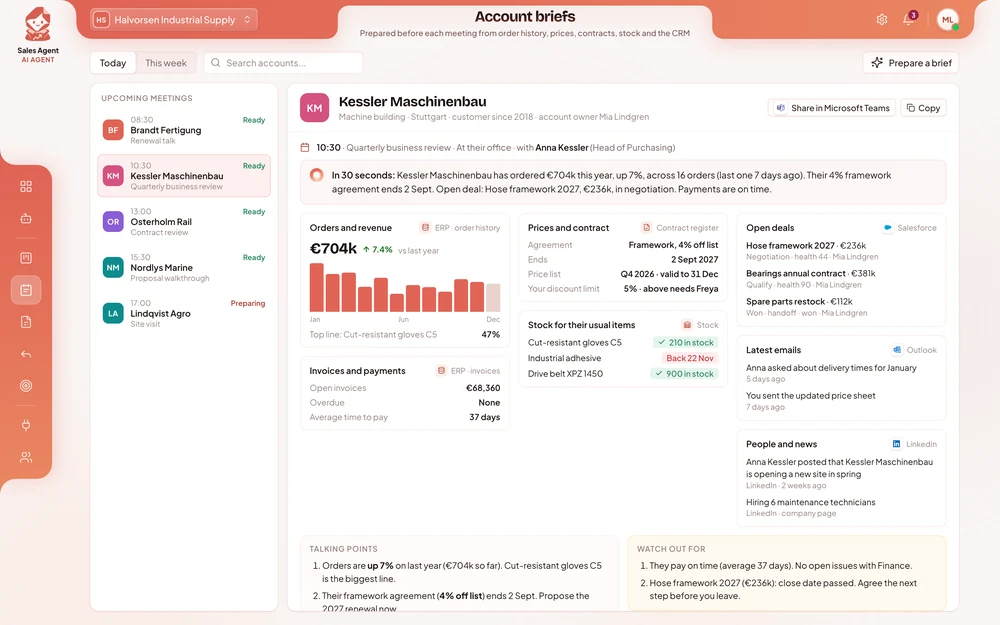
Before each meeting, the rep gets a short brief with orders, open issues, prices and contract dates from your own systems and the CRM.
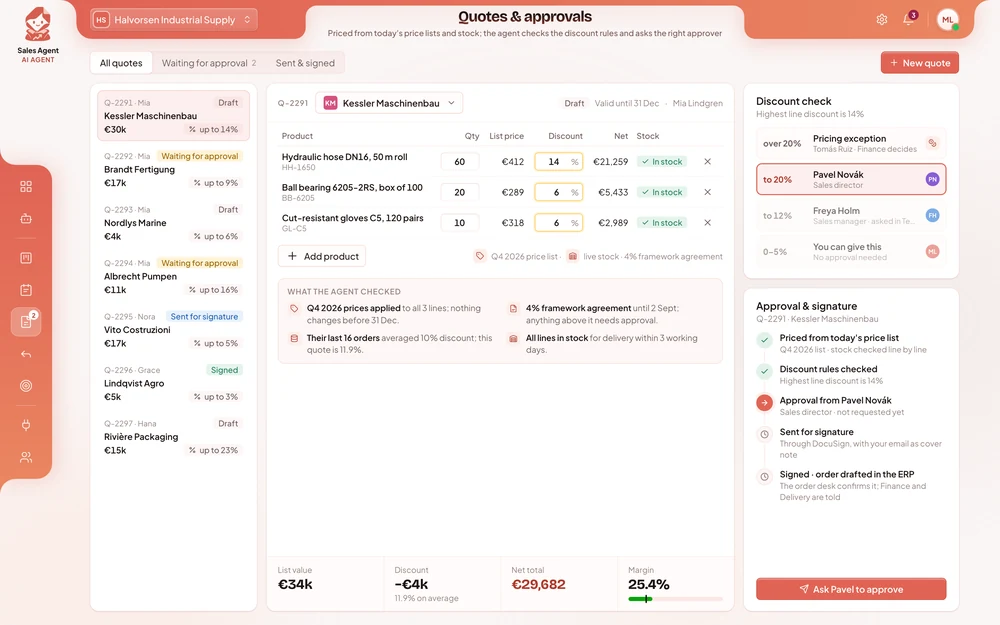
Quotes use your current price lists and discount rules. Anything above a rep’s limit goes to the right manager for approval.
New leads are checked against your criteria and your customer history, so reps spend their time on the ones most likely to buy.
A sales rep asks one question the day before a meeting. The agent looks up the customer’s orders and contract, drafts an agenda and a renewal quote, and adds the meeting to the CRM. The rep checks the quote and decides what to send.
Account managerPrepare me for tomorrow’s meeting with Halden Logistics.
Sales AgentHalden has ordered three times this year, €182k in total. One delivery complaint is still open and their contract renews in March. I’ve drafted an agenda and a renewal quote from the 2027 price list, and added the meeting to Salesforce.
Each one in short: the problem, the results, and how the agent handles the work.
Reps spent up to 45 minutes preparing for a visit: exporting order history from the ERP, checking the customer’s price agreement, asking the warehouse about stock and searching emails.
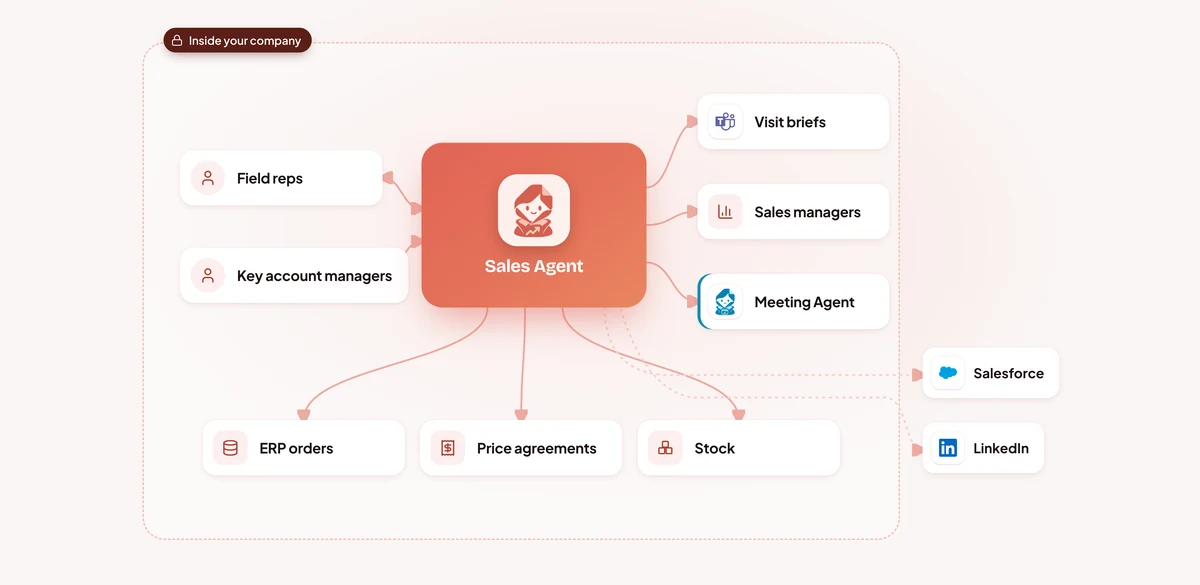
The agent reads the rep’s calendar and recognises customer visits a day ahead.
Order history and open invoices from the ERP, the customer’s price agreement, stock for the items they usually buy and the contract end date.
Open deals and next steps from Salesforce, the latest emails from Outlook and company news from LinkedIn.
Thirty minutes before the visit the rep gets the brief in Teams, with three talking points and anything to watch out for, like an overdue invoice or an ending agreement.
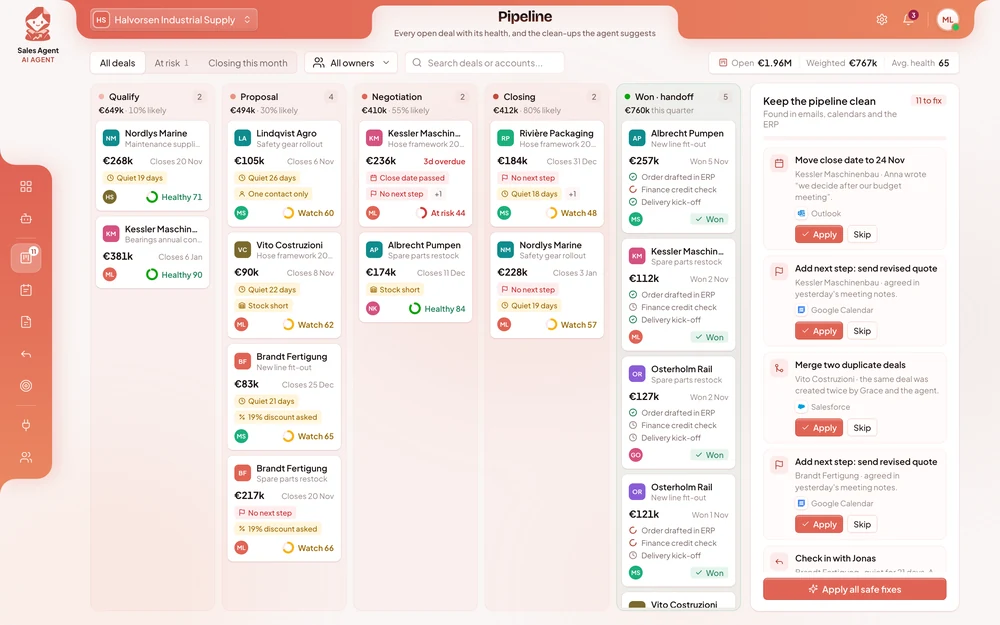
Close dates were weeks in the past, next steps were empty and the same deal often existed twice.
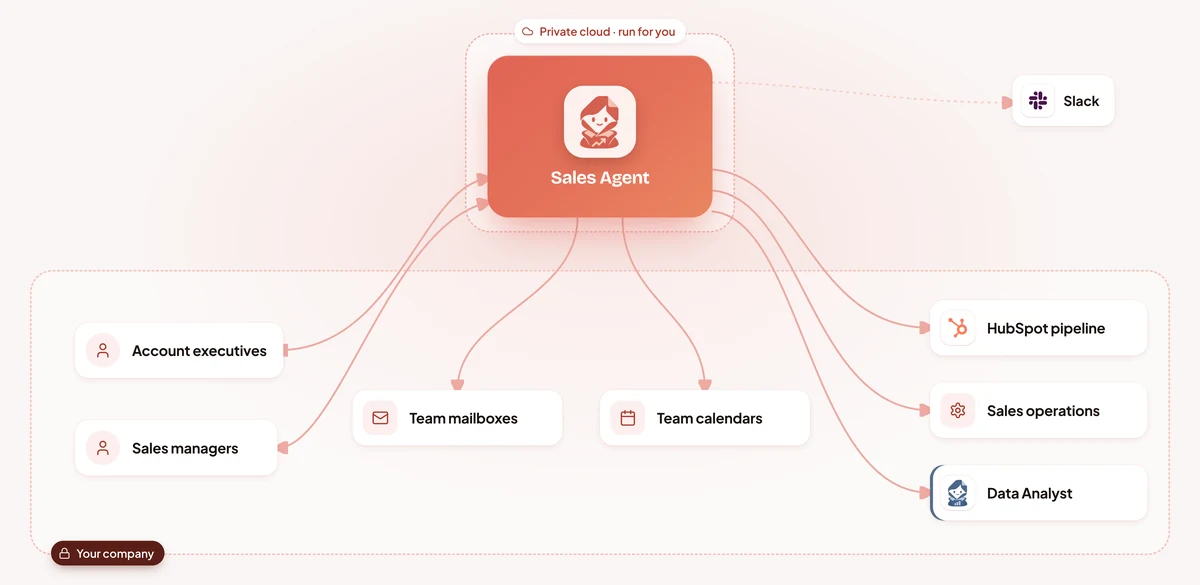
Replies, meeting notes and calendar invites are matched to the right deal and logged in HubSpot.
Past close dates get the date the customer mentioned, empty next steps get the one agreed in the meeting, duplicates are merged and amounts match the latest quote.
Quiet deals and changes that affect commit go to the rep as a suggestion with a draft check-in email.
Each manager gets a Slack summary: what moved in and out of commit, and which deals to talk about.
Account managers started most renewals four weeks before the date.
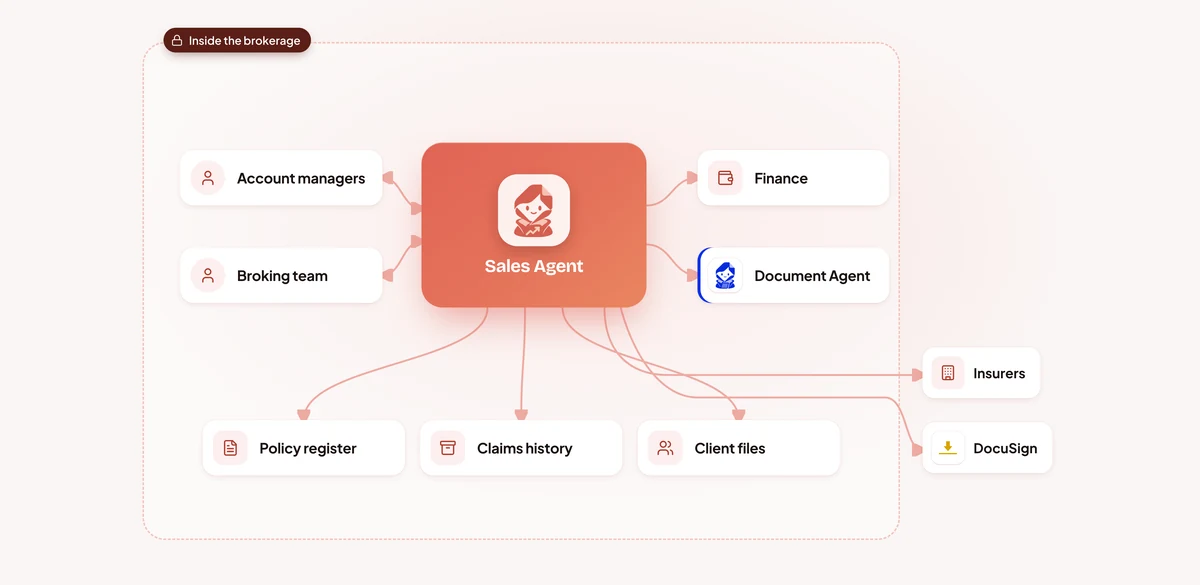
The agent watches every renewal date in the policy register and prepares a pack: claims, premium trend and changes in the client’s risk.
It drafts tailored quote requests from the account manager’s mailbox, with the risk details attached, and collects the answers.
Premiums, excesses and cover are laid side by side with a recommendation, for the account manager to check and decide.
The chosen offer goes to the client through DocuSign.
Tender quotes were built in spreadsheets from exported price lists.
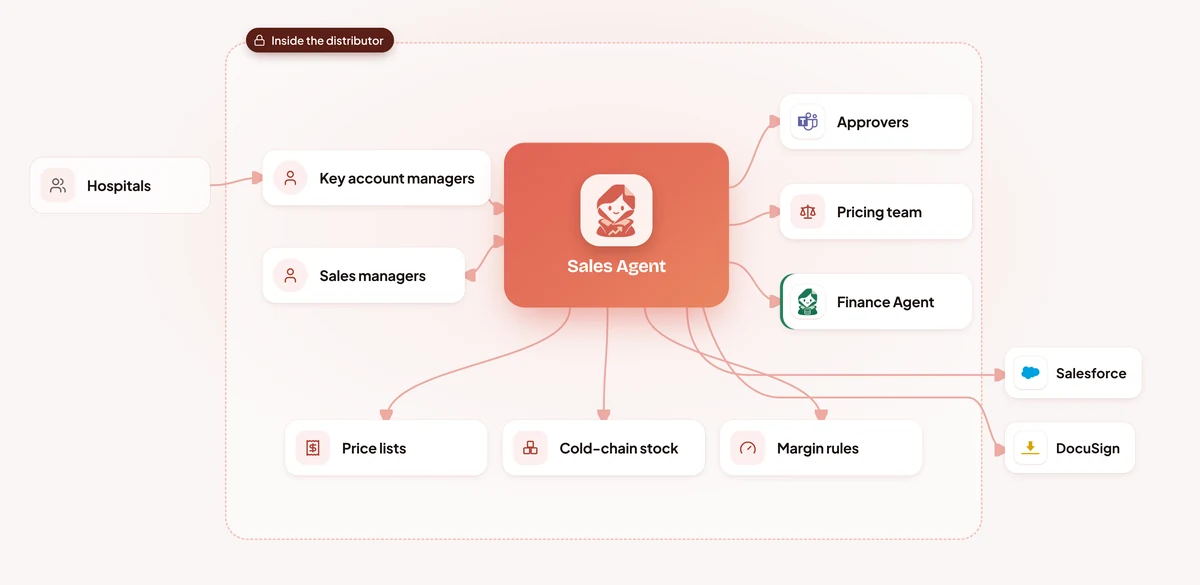
The agent applies the hospital’s tender terms and the price list valid on the delivery date, not the one in last year’s spreadsheet.
Cold-chain lines are checked against batches and expiry dates, and every line against its margin floor.
The highest discount decides who approves.
Once approved, the tender response goes out through DocuSign and the opportunity is updated in Salesforce.
Fleet enquiries waited in shared inboxes while reps were on the forecourt.
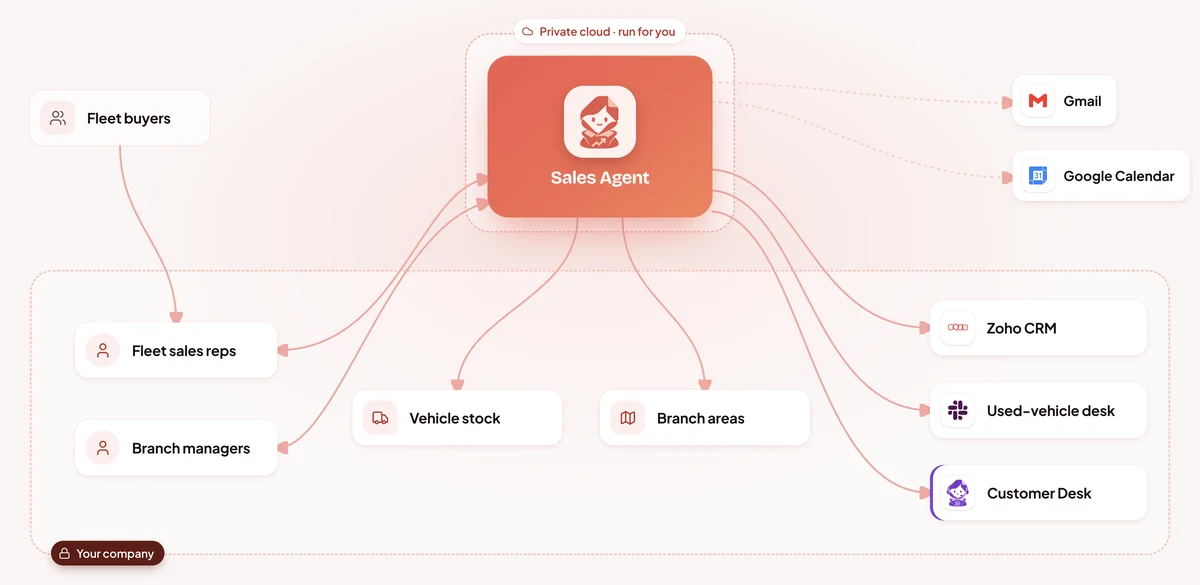
New emails are matched to the right branch and rep, and logged in Zoho CRM within a minute.
The reply suggests vehicles that are in stock now, with a test-drive slot from the rep’s calendar.
Quotes are drafted within the rep’s discount limit, quiet quotes get a check-in, and trade-ins go to the used-vehicle desk in Slack.
At 18:30 each branch manager gets a digest of open enquiries and who still needs an answer.
After signature, account managers spent days collecting site addresses, contacts, equipment lists and purchase order numbers.
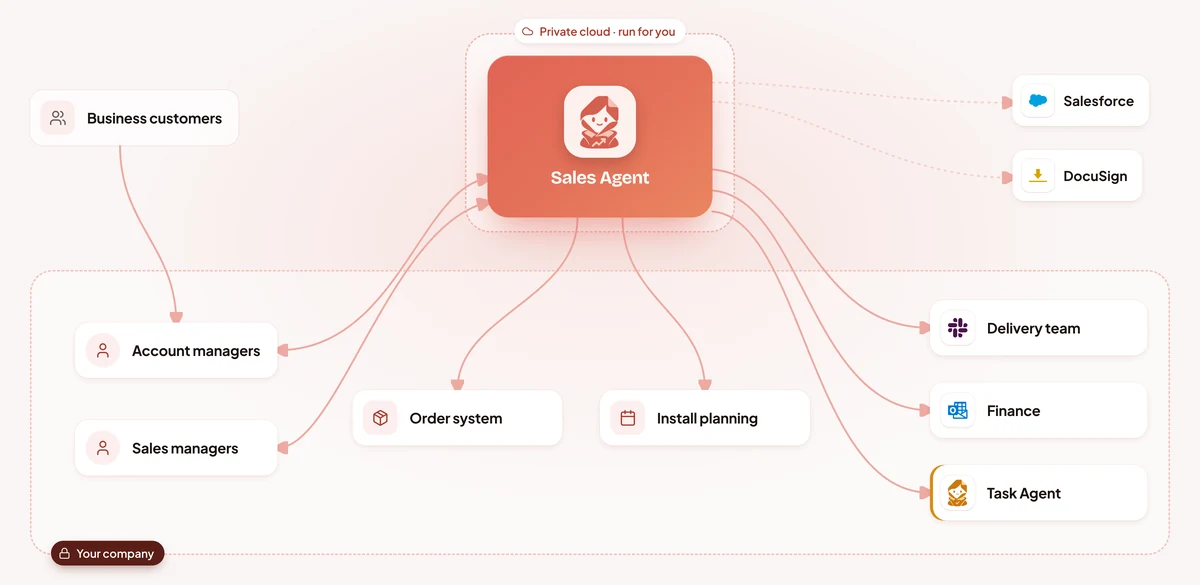
When a quote is signed in DocuSign, the agent marks the deal as won in Salesforce and starts the handover.
Site addresses are checked, equipment per site comes from the signed quote, install slots from the planning tool and contacts from email threads.
A draft billing account, a credit check request, contract dates and the customer’s purchase order number found in email.
Delivery gets its pack in Slack, Finance in Outlook.
Illustrative scenarios with unnamed companies. The figures show the kind of improvement each setup is designed to deliver; actual results depend on volume, the systems connected and how the agent is configured.
We set up the Sales AI Agent around how your sales team works today.
Week 1
We sit with the people who do the work, map the process step by step and find the systems that hold the information. You get a written plan before anything is built.
Weeks 2 to 3
We build and configure the agent around your process: your rules, your approvals, your wording, and connections to your databases and the tools your teams use.
Weeks 3 to 4
We install it inside your infrastructure, or in our cloud if you prefer, and test it with your team on real requests until the results meet the standard you set.
From week 5
We train your employees and administrators, hand over the controls and stay with you: monthly reviews, updates you approve, and the next process when you are ready.
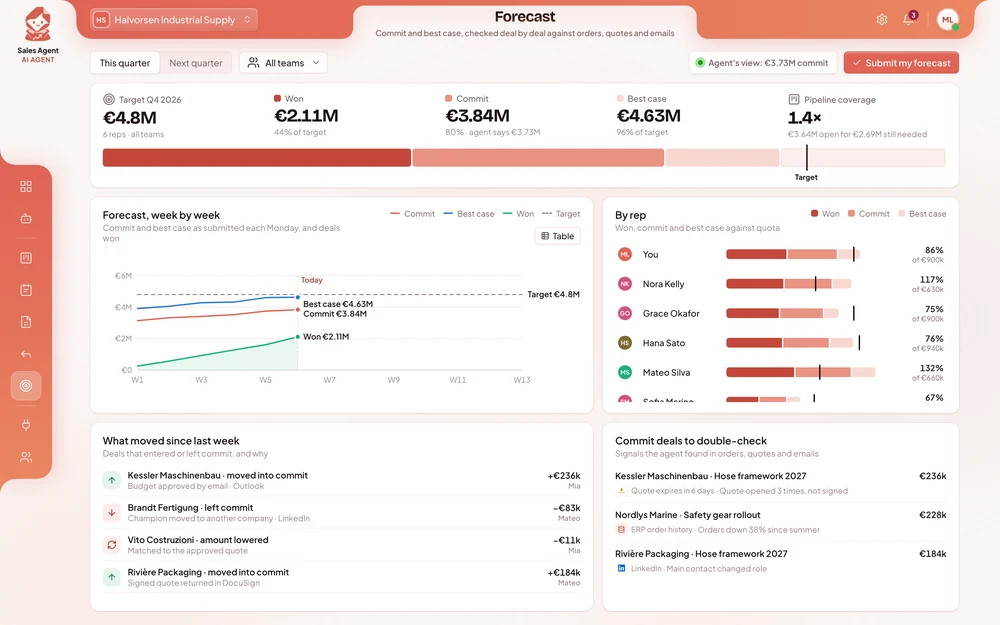
Your reps test the agent on real meetings and quotes within the first weeks. Most companies see the time saved on meeting preparation, CRM updates and quotes during the first month after going live.
It depends on the size of your sales team, the systems it connects to and where it runs. After a first conversation you get a written proposal with the price, so you can compare it with the selling time your reps lose to admin today.
No. It takes over the preparation and admin around selling, so reps spend more time with customers. Relationships, negotiations and decisions on price stay with your people.
It works only from your own systems, price lists and documents, follows the limits you set and flags anything it is unsure about. Every brief, quote and CRM change is recorded, so you can review and correct it.
Yes. You decide which records it may update, which discount each rep may give and who approves the rest. You can pause it at any time.
It can run on your own servers, together with its AI models, so customer records, prices and margins stay inside your company and no outside AI service is used. We have no access to them, and your data is never used to train AI models.
No. It works with Salesforce, HubSpot and Zoho, Outlook, Gmail, Microsoft Teams and Slack, and adds your order system, price lists and contracts to them.
Only if you allow it. By default it drafts emails and follow-ups, and the rep checks and sends them.
One person who knows how your sales process works today, access to test versions of the CRM and the systems involved, and a few hours a week from a handful of reps while we test.
Yes. Most companies start with one team or one job, such as meeting briefs or quotes, see the results, and then extend the agent to the rest of sales.
Tell us how your reps prepare meetings, build quotes and update the CRM today, and where their time goes. You get a written proposal with the expected results, the setup, a timeline and a price.