Finance AI Agent

Finance AI Agent matches every supplier invoice to its order and delivery, checks spend against your policy and takes the routine work out of month-end close. Your finance team closes the books sooner with the same people, and no payment leaves without the approvals you already require.

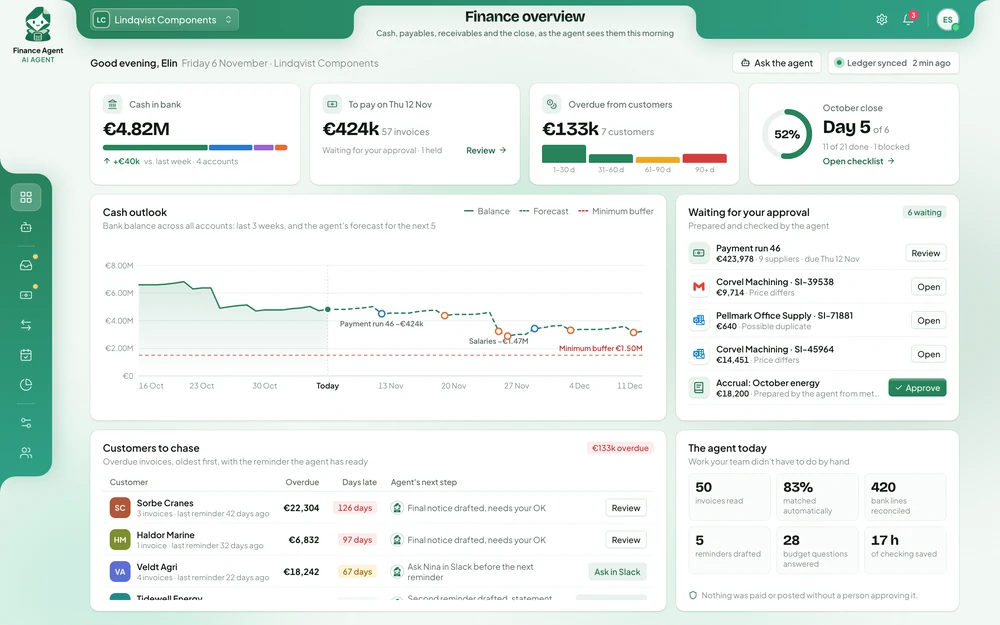
Finance AI Agent overview: cash in the bank, payments waiting for approval, overdue customers and the month-end close

What it means for your business

  • 80%

    of invoices matched automatically

    Before
    Clerks compared each invoice with the order and the delivery by hand, on three screens.
    With Finance Agent
    Matched invoices go straight to approval, and clerks only see the ones that need a decision.
  • −3 days

    to close the month

    Before
    Reconciliation and coding piled up in the last days of the month.
    With Finance Agent
    Bank lines and payouts are matched every day, so most of the close is done when the month ends.
  • 100%

    of expenses checked against policy

    Before
    Expense claims were spot-checked, and mistakes surfaced months later.
    With Finance Agent
    Every claim is checked against your policy, and missing receipts are requested straight away.

What your finance team gets back

01

Invoices approved in days, not chased for weeks

Each invoice is compared with the purchase order and the delivery in your ERP. Differences, duplicates and missing orders are flagged with the documents attached, so early-payment discounts are taken again.
02

Overcharges stopped before they are paid

Prices above the order, short deliveries and invoices sent twice are caught before they reach a payment run, not found in an audit months later.

03

A month-end close that finishes on time

Bank feeds are reconciled every day, the close checklist is prepared and open items are chased, so your team spends the last days of the month on review, not matching.

04

Budget owners answer their own questions

Managers ask in plain words and get the figure with the entries behind it, so finance receives far fewer emails asking how much budget is left.

What it looks like in practice

An accounts payable clerk asks why a supplier has not been paid. The agent checks the invoice against the order and the delivery, finds the difference and asks the supplier for a credit note. The payment is released only once it arrives.

Accounts payable clerkWhy hasn’t the Nordwerk invoice been paid?

Finance AgentInvoice NW-5521 (€14,200) is on hold: the purchase order covers 400 units but the delivery note shows 380. I’ve emailed Nordwerk for a credit note for the 20 missing units and will release the payment when it arrives.

Looked up
  • ERP
  • Purchase orders
  • Accounts
  • Gmail

How six companies use the Finance AI Agent

Each one in short: the problem, the results, and how the agent handles the work.

Invoices reach approval in 2 days instead of 9

Every invoice meant three screens: the invoice in the AP inbox, the order in the ERP and the delivery in the warehouse system.

Manufacturing group · Enterprise, on their own servers · Live in 6 weeks

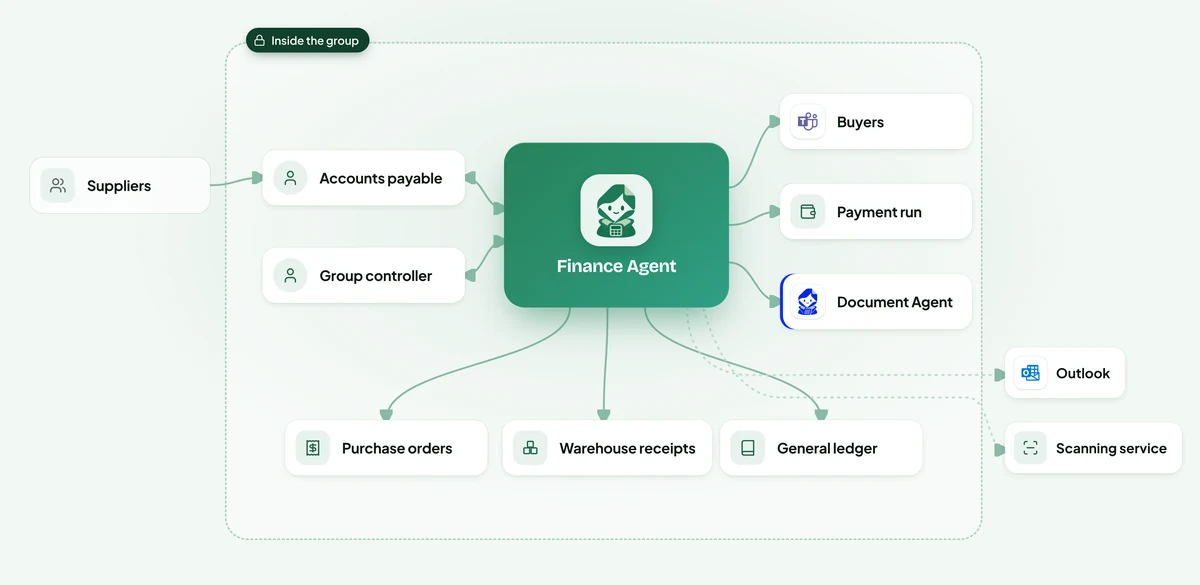
Diagram: where Finance Agent sits. Suppliers send invoices to the group. Inside the group, accounts payable and the group controller ask the agent. It reads purchase orders, warehouse receipts and the general ledger, picks up invoices from the Outlook inboxes and the scanning service, asks buyers in Microsoft Teams about differences, queues matched invoices for the payment run and hands the invoice files to Document Agent.
  1. 1
    Reads every invoice as it arrives

    Supplier, lines, VAT and bank details are read from emails, attachments and scanned post, in any of the group's three languages.

  2. 2
    Checks it at three stations

    It finds the purchase order, confirms what the warehouse received and compares prices line by line, all inside the group's systems.

  3. 3
    Asks the right person about differences

    When something doesn't agree, the buyer who raised the order gets a message in Teams with the difference already worked out, and their answer is attached to the invoice.

  4. 4
    Queues matched invoices for payment

    Matched invoices are coded to the right account and cost centre and queued for Thursday's run, which the group controller approves.

  • 81%matched with no one touching them
  • 9 → 2days from invoice to approval
  • €212k of duplicate payments stoppedReminder copies and re-sent invoices are caught before they reach a payment run.
  • 3clerks moved to supplier work

Every hotel’s daily numbers ready by 06:30

Every morning someone in finance exported the night audit from each hotel, matched card and PayPal payouts by hand and pasted the results into a spreadsheet.

Hotel group · Cloud, run for them · Live in 3 weeks

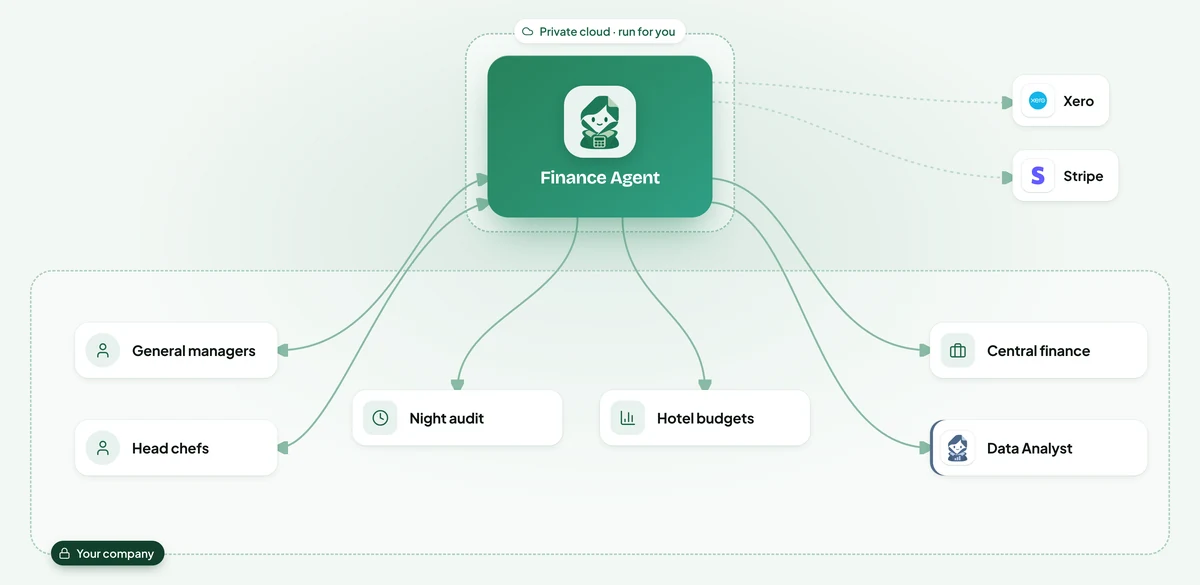
Diagram: where Finance Agent sits. The agent runs in a private cloud for the hotel group. General managers and head chefs ask it about their numbers. It reads each hotel's night audit and budget, looks up Xero and Stripe, sends drafts to central finance to approve and passes the daily figures to Data Analyst.
  1. 1
    Closes the day overnight

    At 02:00 it matches every Stripe and PayPal payout to the bookings and night audit totals, and lists anything that doesn't agree.

  2. 2
    Sends the daily flash

    At 06:30 each general manager gets yesterday's revenue, food cost and cash differences in Slack, with the two or three things worth a look.

  3. 3
    Answers budget questions

    Managers and head chefs ask in Slack and get an answer in seconds, from Xero and the budget, limited to their own hotel.

  4. 4
    Prepares invoices and claims

    Supplier invoices are read and drafted in Xero, and expense claims are checked against the policy, for the finance team to approve.

  • 06:30 daily numbers for every hotelManagers start the day with yesterday's figures instead of waiting for the month-end pack.
  • 100%of payouts matched nightly
  • 9 → 5days to close the month
  • Seconds to answer a budget question

€640k of early subcontractor claims held back until certified

Quantity surveyors and the accounts team compared each application with the contract, the previous payments and the latest site report by hand.

Construction · Enterprise, on their own servers · Live in 7 weeks

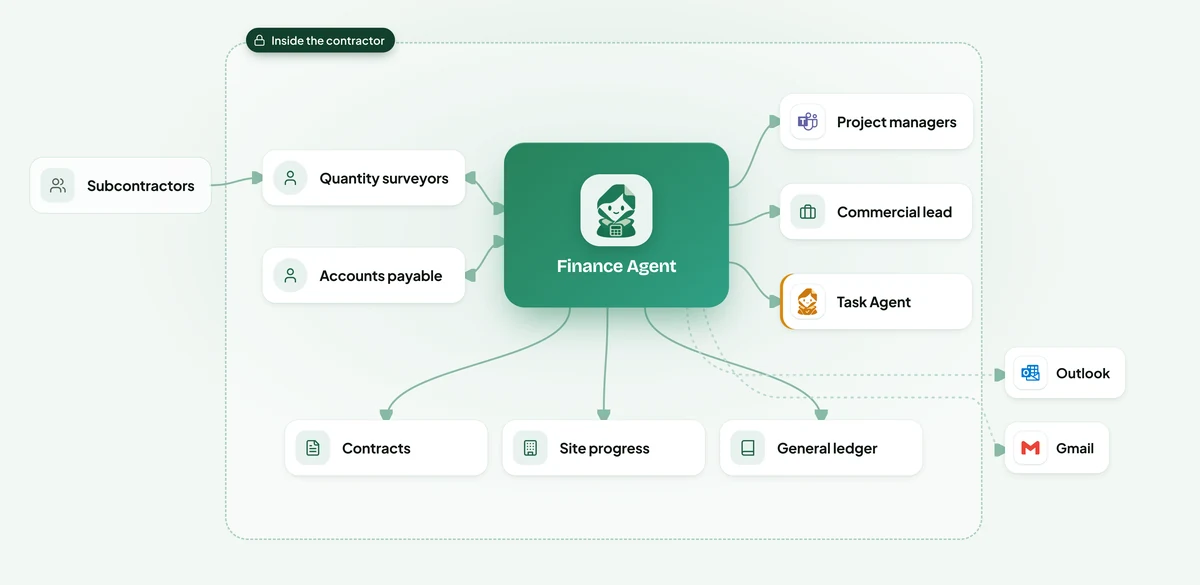
Diagram: where Finance Agent sits. Subcontractors send applications for payment. Inside the contractor, quantity surveyors and accounts payable ask the agent. It reads contracts, site progress and the general ledger, picks up applications from Outlook and Gmail, sends payments to project managers in Microsoft Teams, claims above the contract value to the commercial director, and retention release dates to Task Agent.
  1. 1
    Reads each application

    The claimed work, period and amount are read from each application, whatever template the subcontractor uses.

  2. 2
    Compares it with the site

    It checks the claim against the latest progress the site manager signed off, the contract value and everything already paid.

  3. 3
    Works out what to pay

    The proposed payment holds back uncertified work and the retention, with the working shown line by line.

  4. 4
    Gets it approved

    The project manager approves in Teams, the subcontractor is told what waits and why, and the retention is logged with its release date.

  • €640k of early claims held backWork is paid when the site manager certifies it, not when it is claimed.
  • 12 → 3days to approve an application
  • €4.1M of retention trackedEvery retention is released once, on the right date, with the evidence attached.
  • 22site managers approve in Teams

98% of stores reconciled by 06:00 every morning

Matching took most of a working day, so differences were found days later, when it was hard to ask the store what happened.

Retail chain · Cloud, run for them · Live in 3 weeks

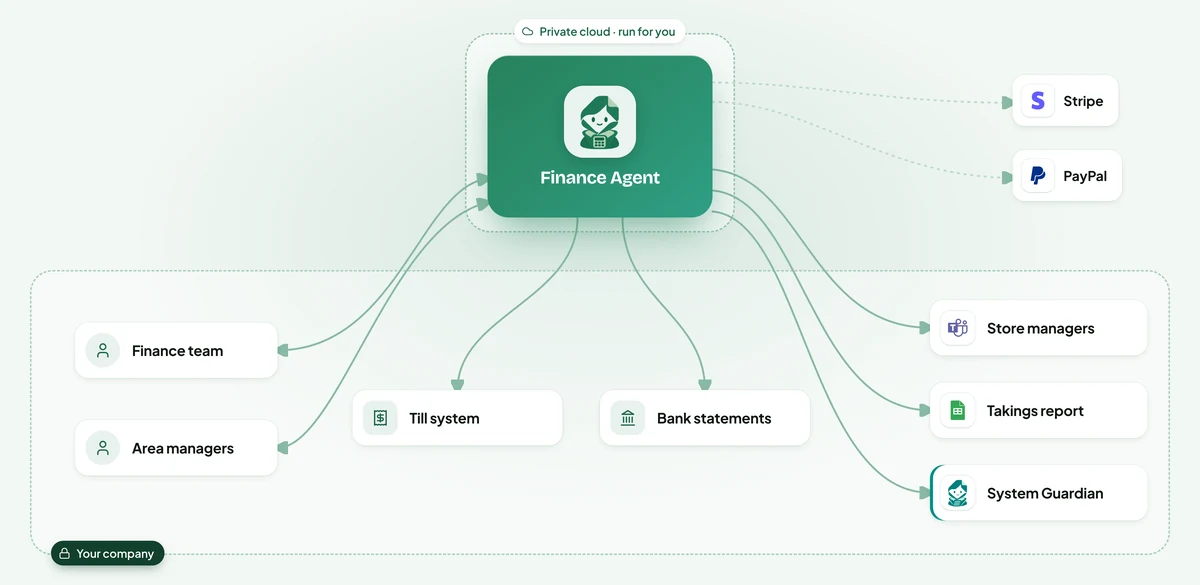
Diagram: where Finance Agent sits. The agent runs in a private cloud for the retail chain. The finance team and area managers ask it about store takings. It reads the till system and bank statements, looks up Stripe and PayPal, asks store managers in Microsoft Teams about gaps, fills the takings report in Google Sheets and tells System Guardian when a store's till export is missing.
  1. 1
    Collects last night's numbers

    Till totals, card payouts, cash deposits and online payouts are gathered for every store as they arrive.

  2. 2
    Matches every store

    Each store's takings are matched to what reached the bank, allowing for card batches that close after midnight.

  3. 3
    Explains or asks

    Timing differences are explained automatically.

  4. 4
    Reports by 08:00

    Area managers get a daily takings report in Google Sheets, and finance gets the suggested entries for fees to approve.

  • 98%of stores matched by 06:00
  • Same daycash differences found
  • −2 daysto close each month
  • 1 → 0people matching takings by hand

€1.1M of carrier overcharges disputed every year

The accounts payable team could only spot-check carrier invoices.

Logistics · Enterprise, on their own servers · Live in 5 weeks

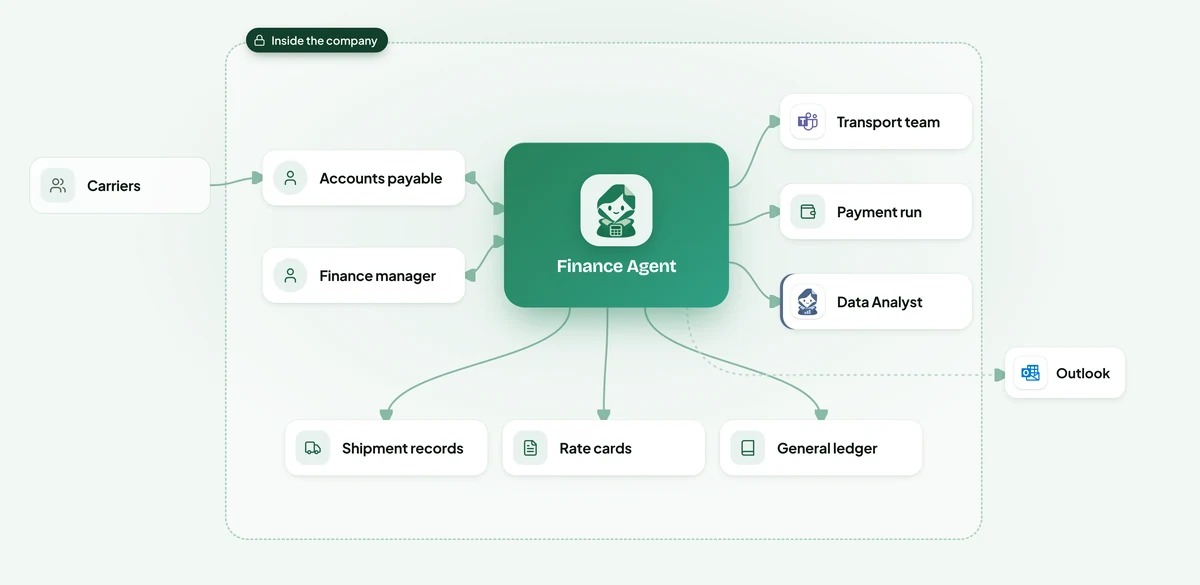
Diagram: where Finance Agent sits. Carriers send their invoices. Inside the company, accounts payable and the finance manager ask the agent. It reads shipment records, rate cards and the general ledger, picks up invoices from Outlook, asks transport planners in Microsoft Teams about waiting time, approves correct invoices for the payment run and passes overcharge patterns to Data Analyst.
  1. 1
    Reads every carrier invoice

    Each charge is read from PDFs and e-invoices: linehaul, fuel, waiting time, tolls and extras.

  2. 2
    Weighs it against the record

    It compares every charge with the rate card for that lane and with what the shipment record shows actually happened.

  3. 3
    Asks planners when unsure

    If the record is unclear, the transport planner is asked in Teams whether the waiting time or extra stop really happened.

  4. 4
    Drafts the dispute, approves the rest

    Correct invoices are approved for payment.

  • €1.1M of overcharges disputed a yearMostly fuel surcharges at old rates and waiting time that never happened.
  • 92%of invoices approved untouched
  • 1 dayto raise a dispute
  • 2.5×invoices per AP clerk

Grant reports drafted in 3 days, not three weeks

Field staff submitted expense claims in six currencies, and the small finance team coded each one to a grant by hand.

Non-profit · Cloud, run for them · Live in 3 weeks

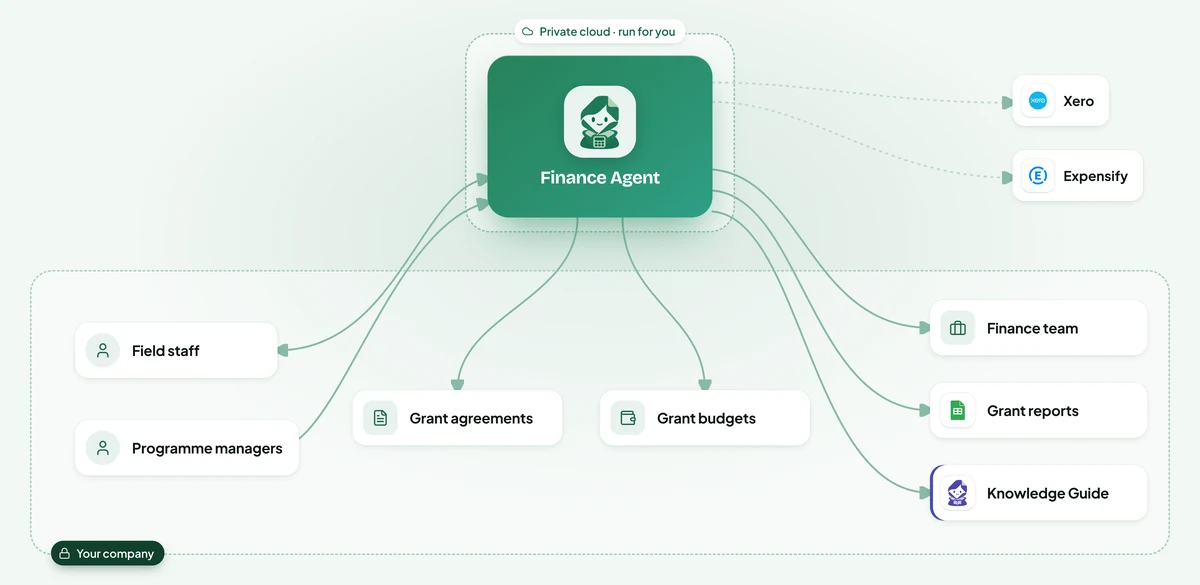
Diagram: where Finance Agent sits. The agent runs in a private cloud for the non-profit. Field staff and programme managers ask it about claims and grant spending. It reads the grant agreements and budgets, looks up Xero and Expensify, sends journals to the finance team to check, drafts grant reports in Google Sheets and gives Knowledge Guide the rules on what each grant may pay for.
  1. 1
    Codes every cost to a grant

    Expense claims, supplier bills and field transfers are matched to the programme, the grant and the budget line, with the reason recorded.

  2. 2
    Keeps restricted money apart

    A cost that a grant doesn't allow is flagged before it is booked, with a suggestion of where it can go instead.

  3. 3
    Warns before a grant runs out

    Budget holders are told in Slack when a grant is spending faster than planned, while there is still time to adjust.

  4. 4
    Drafts the donor report

    Grant reports are drafted in Google Sheets with every number linked to its receipts, for the programme manager and finance to complete.

  • 3 daysto draft a grant report
  • 100%of costs coded to a grant
  • 2 daysto approve a field claim
  • −60%audit preparation time

Illustrative scenarios with unnamed companies. The figures show the kind of improvement each setup is designed to deliver; actual results depend on volume, the systems connected and how the agent is configured.

From first conversation to live in three to seven weeks

We set up the Finance AI Agent around how your finance team works today, from the invoice inbox to the month-end close.

  1. 1

    Week 1

    Learn your process

    We sit with the people who do the work, map the process step by step and find the systems that hold the information. You get a written plan before anything is built.

  2. 2

    Weeks 2 to 3

    Customize your agent

    We build and configure the agent around your process: your rules, your approvals, your wording, and connections to your databases and the tools your teams use.

  3. 3

    Weeks 3 to 4

    Deploy and test with your team

    We install it inside your infrastructure, or in our cloud if you prefer, and test it with your team on real requests until the results meet the standard you set.

  4. 4

    From week 5

    Onboard your team

    We train your employees and administrators, hand over the controls and stay with you: monthly reviews, updates you approve, and the next process when you are ready.

What your team and managers see

Finance AI Agent, overview screen
Overview. Cash in the bank, payments due, overdue customers and what is waiting for your approval today.
Finance AI Agent, invoice inbox screen
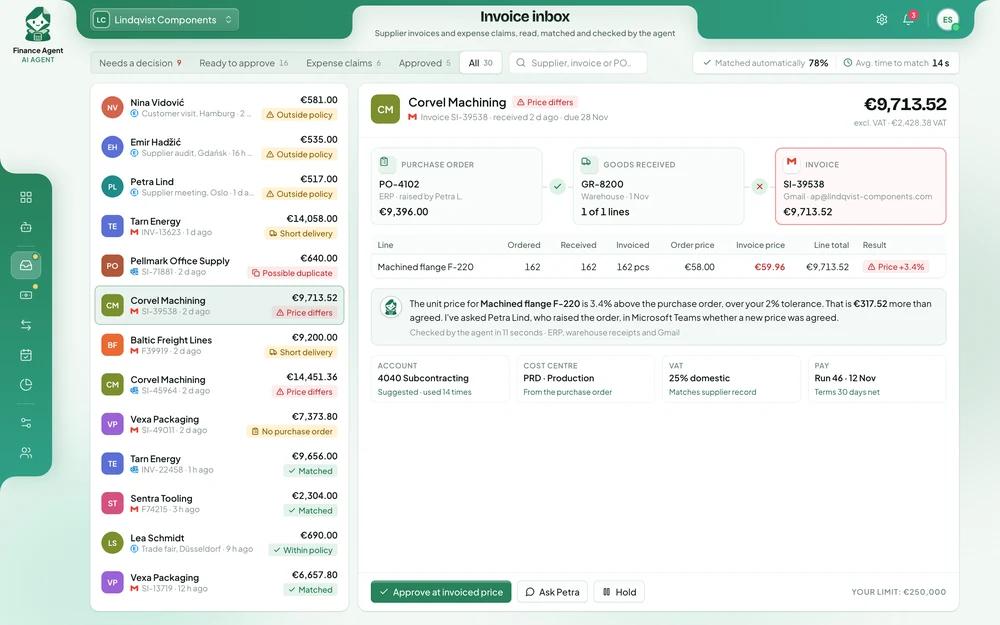
Invoice inbox. Each invoice is matched to its order and delivery, and every difference is explained before anyone approves it.
Finance AI Agent, month-end close screen
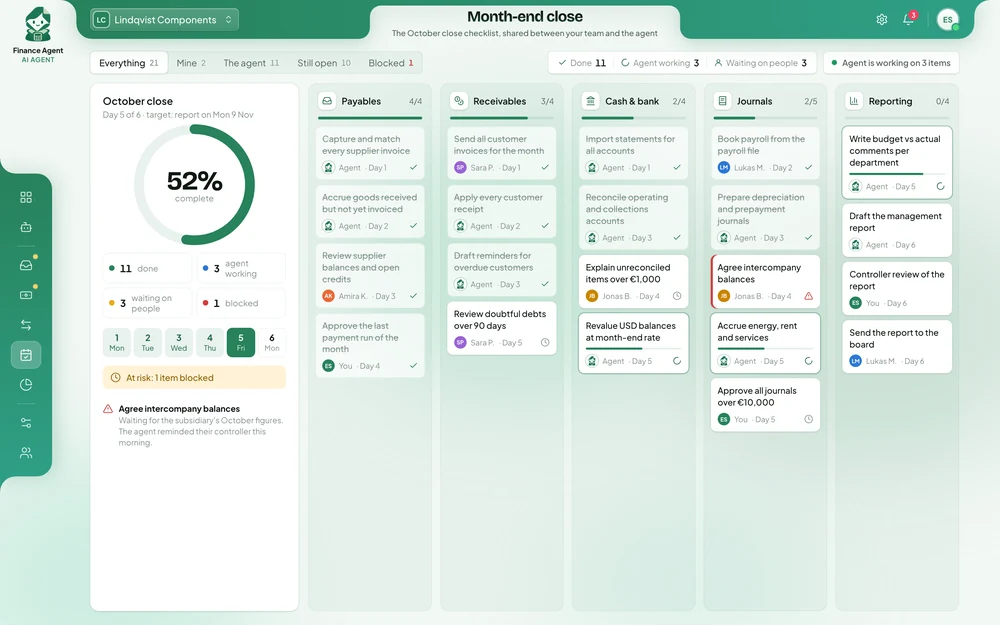
Month-end close. The close checklist shared between your team and the agent, with blocked items flagged early.
Finance AI Agent, the agent’s own role screen
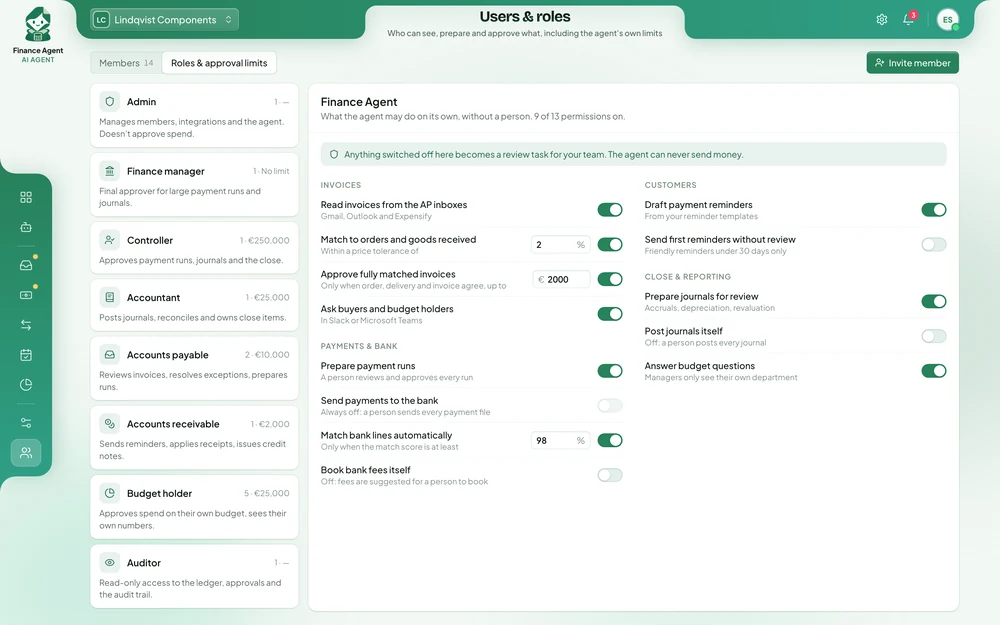
The agent’s own role. What the agent may do alone, up to which amount, and what always needs a person.

Finance AI Agent: questions from business leaders

How quickly will we see results?

Your team tests the agent on real invoices and bank lines within the first weeks. Most companies see the share of invoices it matches, and the days saved at month end, during the first close after going live.

What does it cost?

It depends on your invoice volume, the systems it connects to and where it runs. After a first conversation you get a written proposal with the price, so you can compare it with what the work costs you today.

Will it replace our finance staff?

It takes over the typing, matching and chasing, so the same team can handle more invoices and spend its time on suppliers, budgets and analysis. Approvals, exceptions and decisions that need judgement stay with your people.

What if it matches something wrongly?

It works only from your own ledger, orders and documents, follows the tolerances you set and passes anything it is unsure about to a person. Every match and action is logged, so you and your auditors can review it.

Can it make payments?

No payment leaves without the approvals you already require. The agent prepares payment runs and releases only what your rules allow, and you can switch off any action at any time.

Is our financial data safe?

It can run on your own servers, with its AI models, so supplier prices, ledgers and bank data stay inside your company and no outside AI service sees them. We have no access to it, and your data is never used to train AI models.

Do we have to change our accounting system?

No. It works with SAP, Oracle, Odoo, Xero and QuickBooks, plus your own ERP, and with Outlook, Gmail, Microsoft Teams, Slack and Expensify.

Can we control what it does?

Yes. You decide which invoices it may approve alone and up to what amount, the price tolerance it works to, and which journals always need a person. Anything switched off becomes a review task for your team.

What do you need from our team?

One person who knows how payables and the close work today, access to test versions of the systems involved, and a few hours a week from the team while we test.

Can we start small?

Yes. Most companies start with supplier invoices or bank reconciliation for one entity, see the results, and then extend the agent to expenses and the close.

See what the Finance AI Agent can do for your finance team.

Tell us how many invoices your team handles, which systems hold your orders and ledger, and what slows the close down. You get a written proposal with the expected results, the setup, a timeline and a price.

Ask for a proposal info@ihtech.ba

Sarajevo, Bosnia and Herzegovina