Contracts reviewed in minutes, not days
Each draft is compared with your standard clauses before a lawyer opens it, so your lawyers spend their time on the points that matter.
 Document AI Agent
 finds, reads and checks your contracts, invoices and records, then moves them through approval with the details already filled in. Your legal and procurement teams spend their time on decisions instead of searching and retyping, and every signature stays with your people.
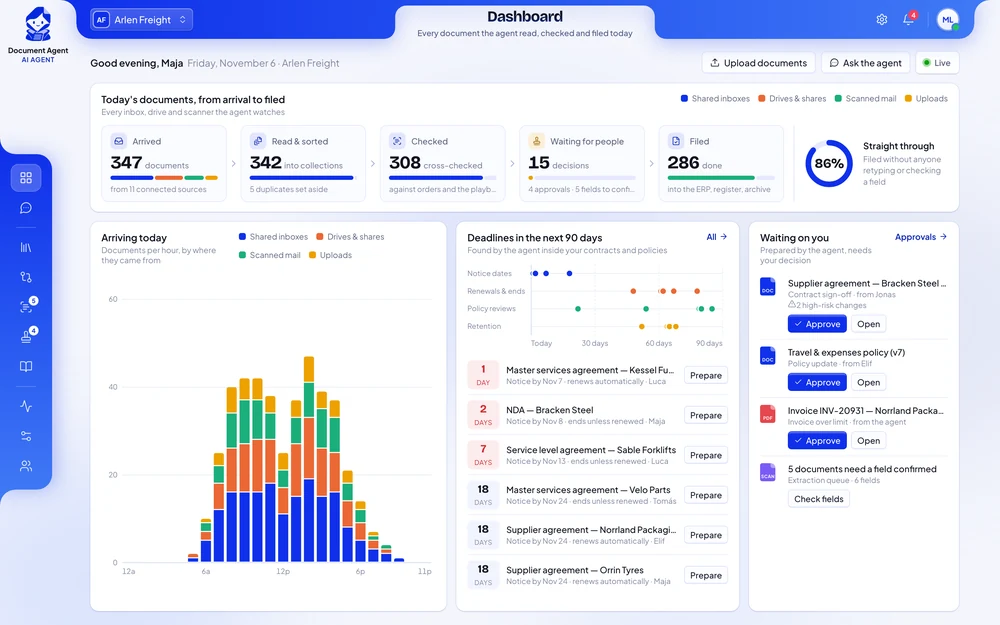
−70%
time to review a standard contract
100%
of renewals flagged before the notice date
5 s
to find any signed document
Each draft is compared with your standard clauses before a lawyer opens it, so your lawyers spend their time on the points that matter.
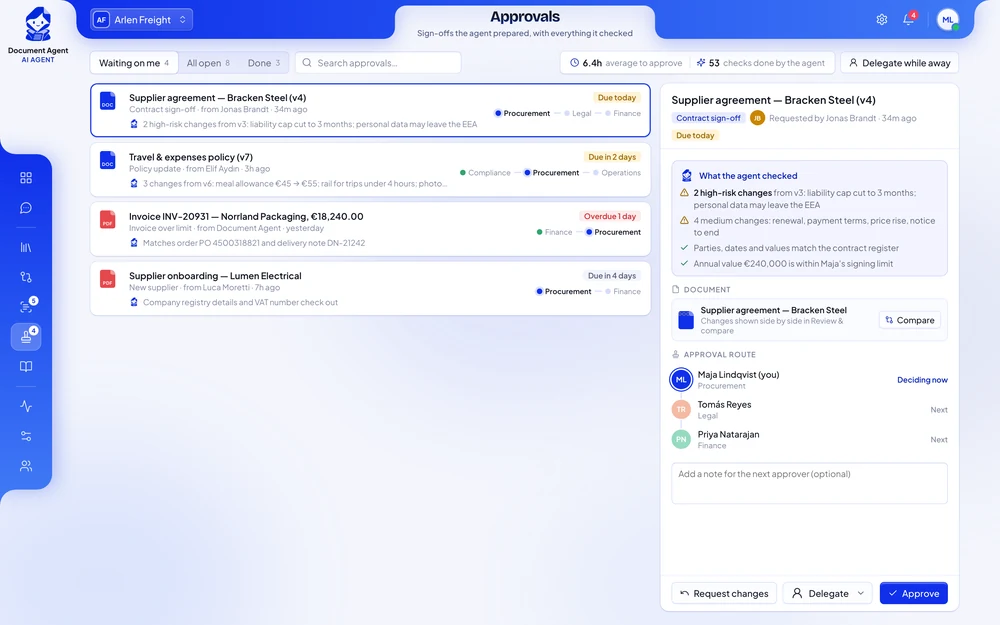
Renewals, break options and notice periods are read from the signed documents and flagged in time, so contracts no longer renew by accident.
Dates, amounts and parties go straight into your ERP and contract register. Only the fields the agent is unsure about wait for a person.
Documents reach the right people in the right order, with reminders and signatures in DocuSign. Every decision stays with your people and is recorded.
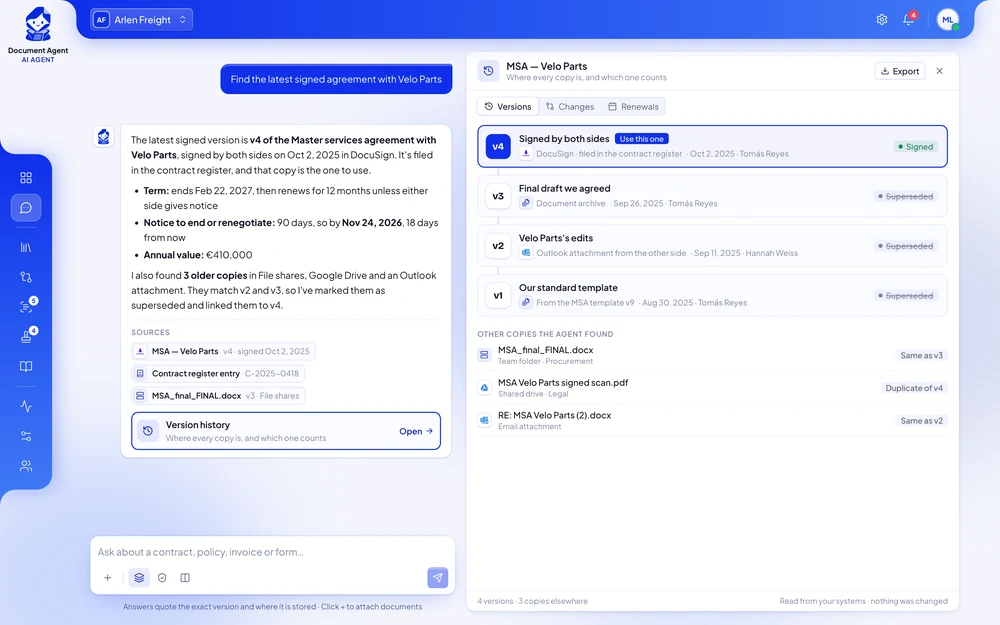
A procurement employee asks one question. The agent reads the supplier contracts in the contract repository and the ERP, lists the ones that renew automatically and sends procurement a summary. The employee decides which ones to renegotiate.
Procurement team memberWhich supplier contracts renew automatically next quarter?
Document AgentSeven contracts renew between January and March. Three include price increases above 5%. I’ve listed them with their notice deadlines and sent the summary to procurement in Slack.
Each one in short: the problem, the results, and how the agent handles the work.
Counterparty drafts arrived in the legal intake mailbox at all hours.
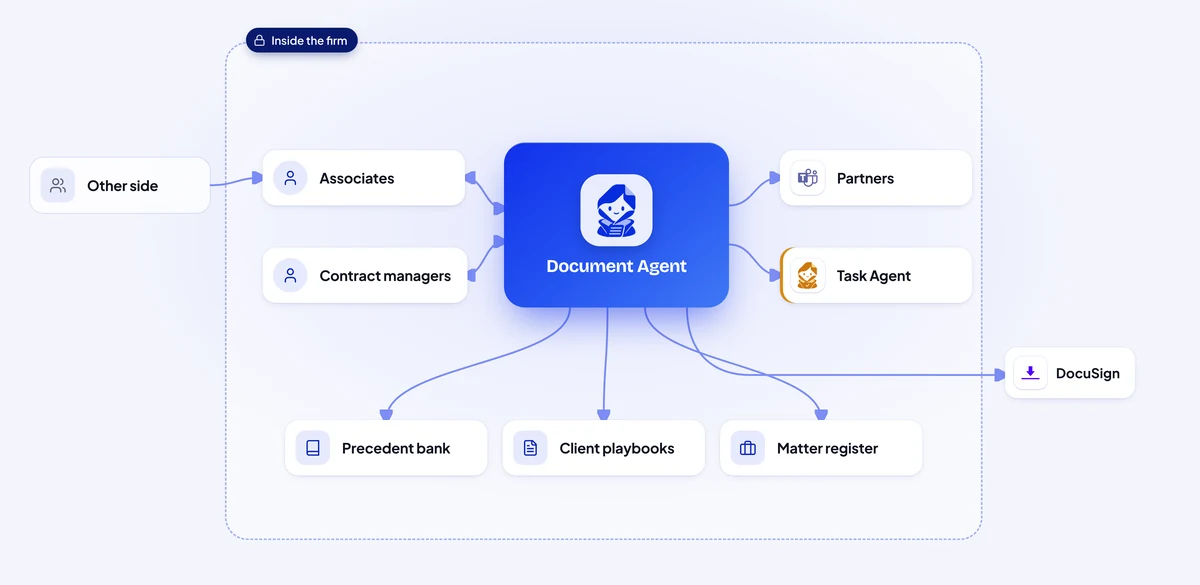
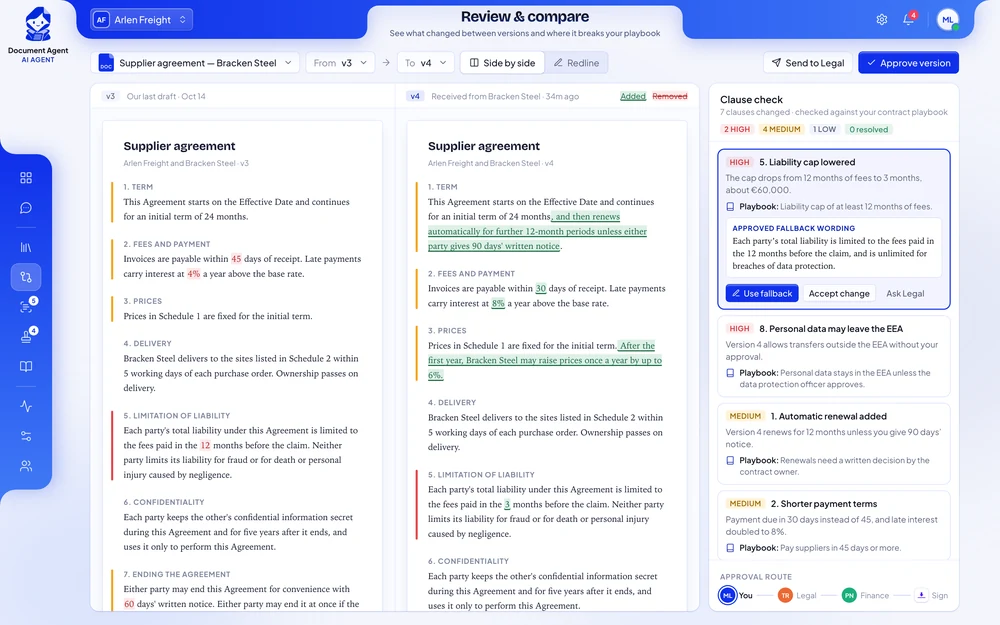
When a counterparty draft lands in the intake mailbox, the agent files it to the right matter and finds the version the firm last sent.
Each clause is compared with the firm’s precedent bank and the client’s playbook.
Where the other side moved away from the playbook, the agent suggests the approved fallback wording.
The associate checks the mark-up, the partner approves in Microsoft Teams, and only then is the agreed version prepared for signature in DocuSign.
Invoices arrived in a shared Gmail inbox and through a supplier upload folder, many of them scans.
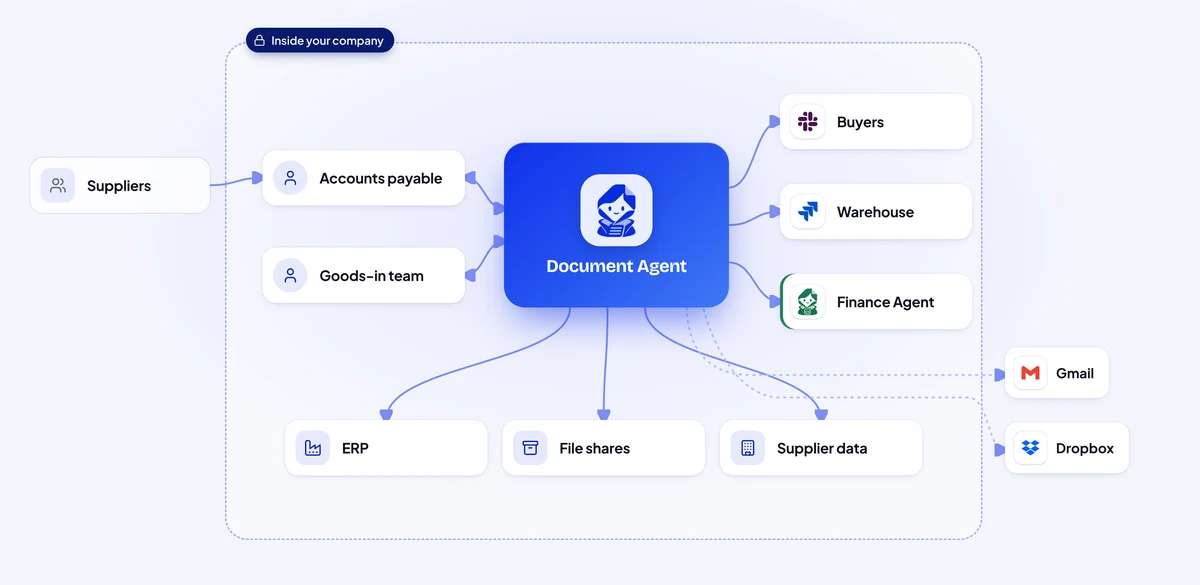
The agent reads supplier, order number, lines, quantities, prices, totals and bank details from emails, uploads and scans, field by field, with a confidence score.
It finds the purchase order in the ERP and the delivery note on the file share and checks that quantity, price and order number agree.
Invoices that match on all three are grouped into a daily batch.
A price difference goes to the buyer in Slack, a missing goods receipt becomes a Jira issue for the warehouse, and changed bank details go to Finance in Teams.
Documents came in through the claims mailbox, the loss adjusters’ Box folder and the customer app.
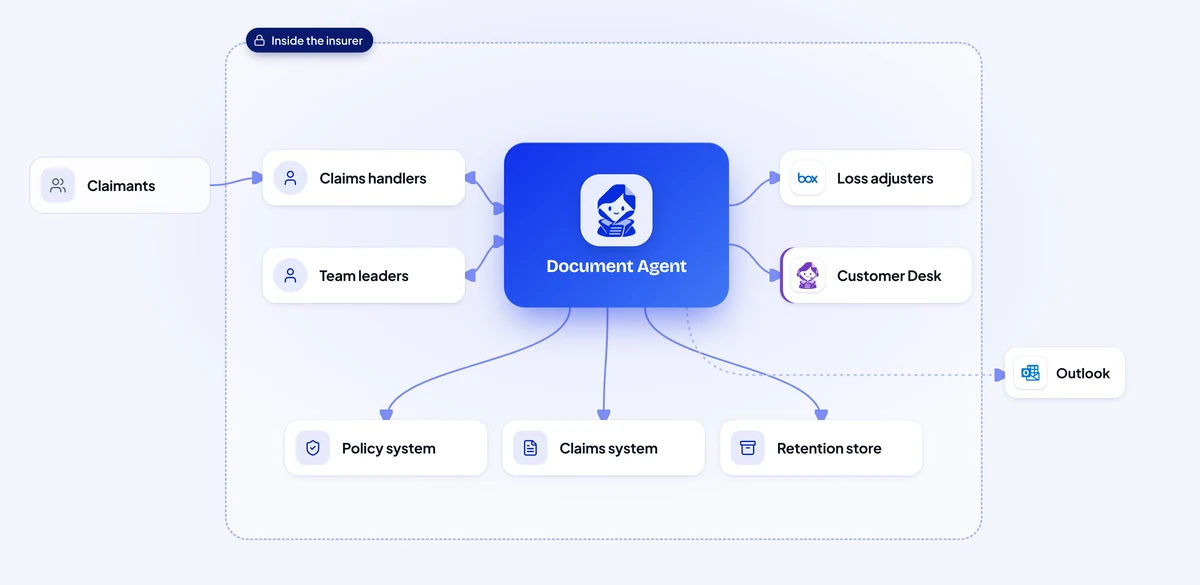
The agent reads every attachment, works out what it is and which claim it belongs to, even when the claim number is missing, using names, dates and the vehicle or address.
Amounts, dates, line items and bank details are read field by field and checked against the policy: cover, excess and limits.
Each claim type has a checklist.
The handler sees one claim file with a summary, approves it in Teams, and only then are the amounts entered into the claims system.
Every lease has its own break options, rent review dates, notice periods and side letters that change them.
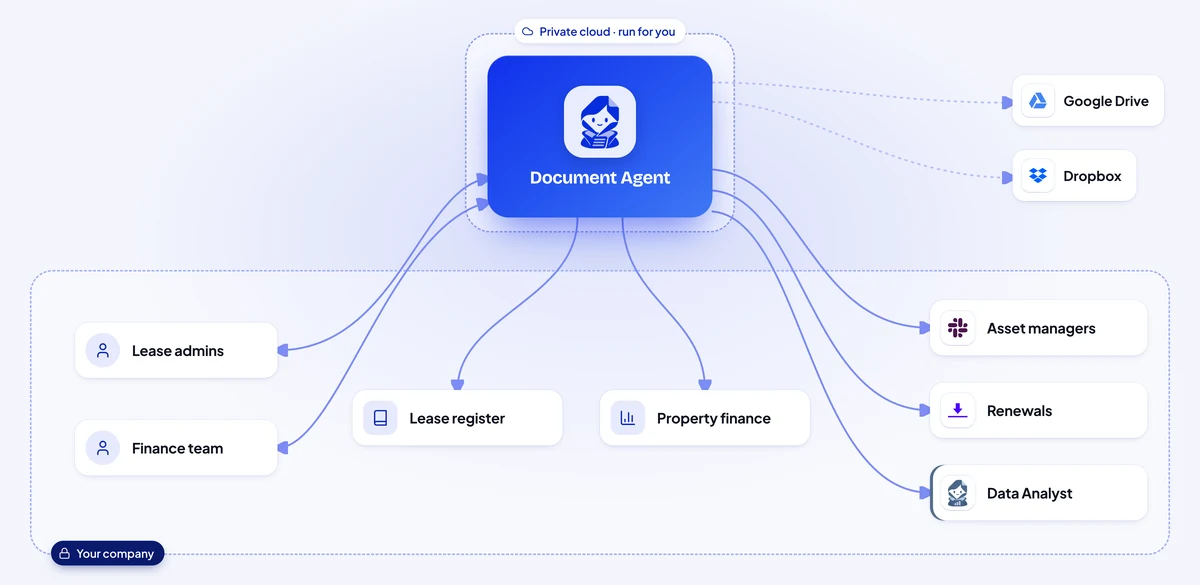
The agent links each side letter and amendment to its lease, so the dates it captures are the ones that apply today.
Break options, rent reviews, notice periods and lease ends are placed on one timeline per building and written to the lease register in Notion, with a link to the clause.
Ahead of each date, the asset manager gets a message in Slack with the clause quoted and what needs deciding.
For a rent review it prepares the index figures; for a renewal it drafts the new lease from the approved template, which is signed in DocuSign once approved.
Officers answering an information request searched shared drives folder by folder, then read every page to remove personal details.
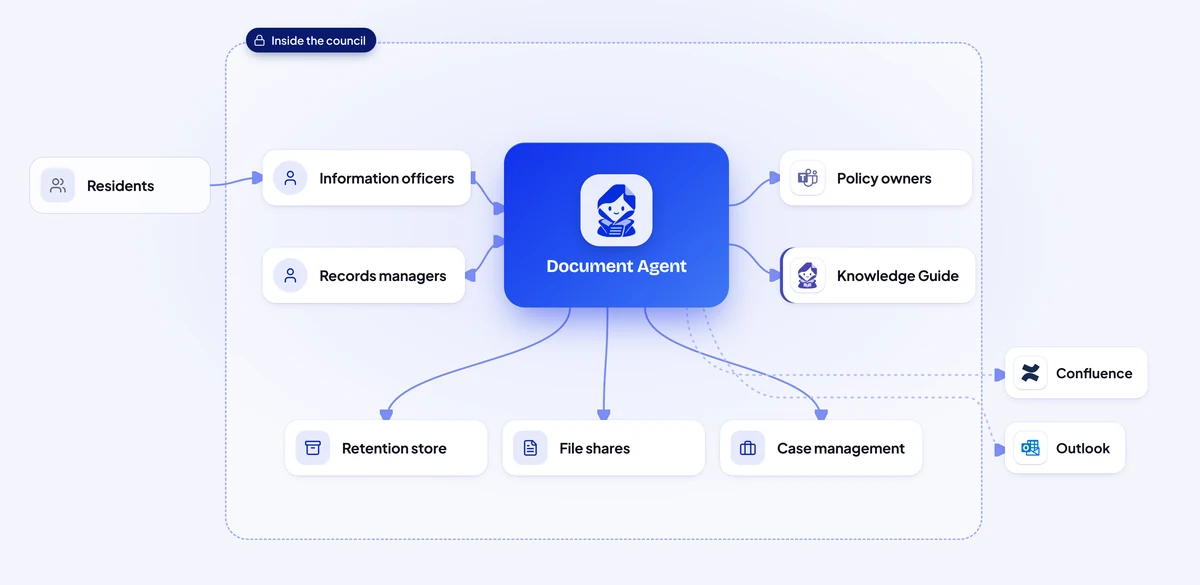
The agent reads each record, decides which class of the retention schedule it belongs to and applies the label in the records-retention store, with the reason.
When a request arrives, it finds every relevant document, removes duplicates and marks names, addresses and other personal details for redaction.
When a policy owner publishes a new version in Confluence, the agent lists every guide, form and letter template that still quotes the old rule and sends the list to the owner in Teams.
Each month a records manager receives the list of records past their retention period, with legal holds already removed, and approves the disposal.
Shippers emailed their paperwork to the operations inbox, often just before loading.
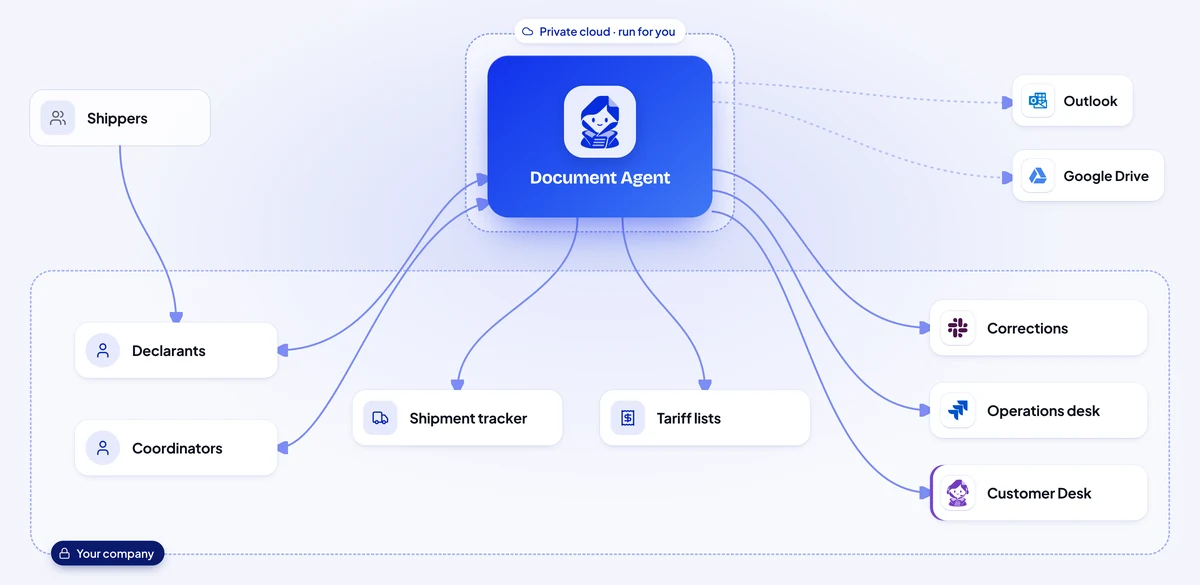
When a shipper’s email arrives, the agent recognises each document in the pack and reads consignee, weights, packages, tariff codes, origin and value.
The same field is compared across every document and against the customer’s tariff list.
A mismatch goes straight to the shipper in Slack with the two figures quoted, and a Jira issue keeps the operations desk informed until the corrected document arrives.
The declarant receives a checked pack with the declaration fields filled in, files the declaration and the truck crosses without waiting.
Illustrative scenarios with unnamed companies. The figures show the kind of improvement each setup is designed to deliver; actual results depend on volume, the systems connected and how the agent is configured.
We set up the Document AI Agent around how your legal, procurement and finance teams work today.
Week 1
We sit with the people who do the work, map the process step by step and find the systems that hold the information. You get a written plan before anything is built.
Weeks 2 to 3
We build and configure the agent around your process: your rules, your approvals, your wording, and connections to your databases and the tools your teams use.
Weeks 3 to 4
We install it inside your infrastructure, or in our cloud if you prefer, and test it with your team on real requests until the results meet the standard you set.
From week 5
We train your employees and administrators, hand over the controls and stay with you: monthly reviews, updates you approve, and the next process when you are ready.
Your team tests the agent on real contracts and invoices within the first weeks. Most companies see shorter review times and fewer documents typed by hand during the first month after going live.
It depends on how many documents you handle, the systems it connects to and where it runs. After a first conversation you get a written proposal with the price, so you can compare it with what the work costs you today.
It takes over the searching, comparing and retyping, so the same team can handle more documents and spend its time on negotiations and judgement. Decisions and signatures stay with your people.
It links every finding to the clause or field it came from, and fields it is unsure about wait for a person to confirm. Every change it makes is recorded, so you can review and correct it.
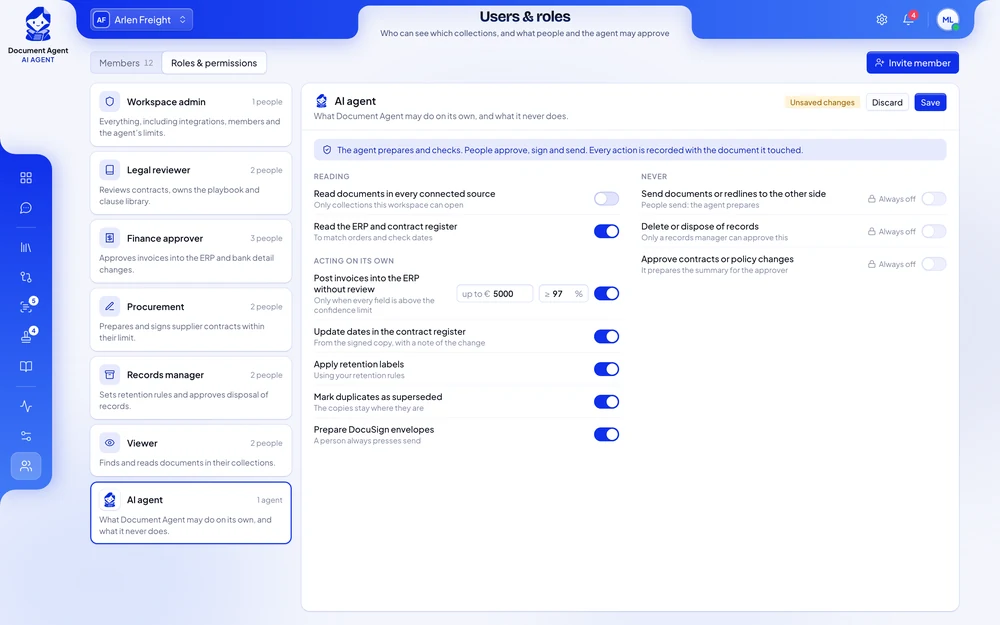
Yes. You decide which documents it may read, which details it may post on its own and up to what amount, and what always needs an approver. You can pause it at any time.
It can run on your own servers, together with its AI models, so documents stay inside your company, no outside AI service is used and we have no access to them. It follows the access rights you already have, so employees only see what they are allowed to see.
No. It works with your document archive, SharePoint, shared drives, Outlook, DocuSign and your ERP. Scanned contracts and PDFs become searchable like any other document.
No. It compares documents with the rules your legal team defines and flags the differences. Your lawyers make the decisions.
One person who knows how documents are handled today, your standard clauses or playbook, access to test versions of the systems involved, and a few hours a week from the team while we test.
Yes. Most companies start with one document type, such as supplier contracts or invoices, see the results, and then extend the agent to other teams.
Tell us which documents your teams handle, where they are kept and where they wait the longest. You get a written proposal with the expected results, the setup, a timeline and a price.