Fewer repetitive questions
Order status, account and plan questions are answered in the customer’s own channel, day and night, so your team stops answering the same questions all day.
 Customer Desk AI Agent
 answers your customers’ routine questions in seconds and passes everything else to the right person with the work already prepared. Your support team handles more requests with the same people, and you stay in control of every decision that matters.
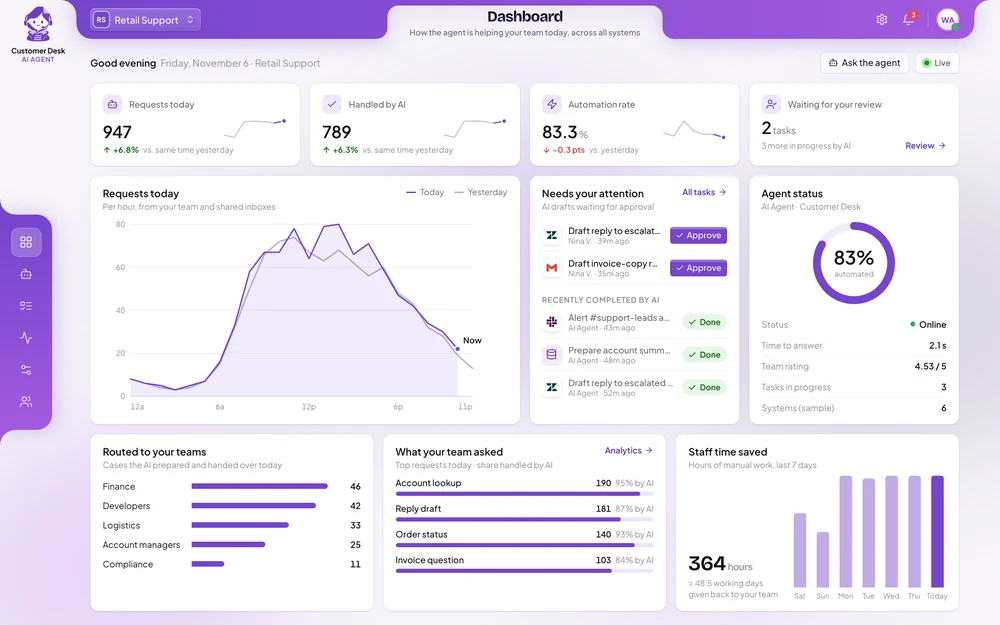
61%
of routine requests answered without a person
4 min
for a request to reach the right team
3×
more bug reports developers can act on first time
Order status, account and plan questions are answered in the customer’s own channel, day and night, so your team stops answering the same questions all day.
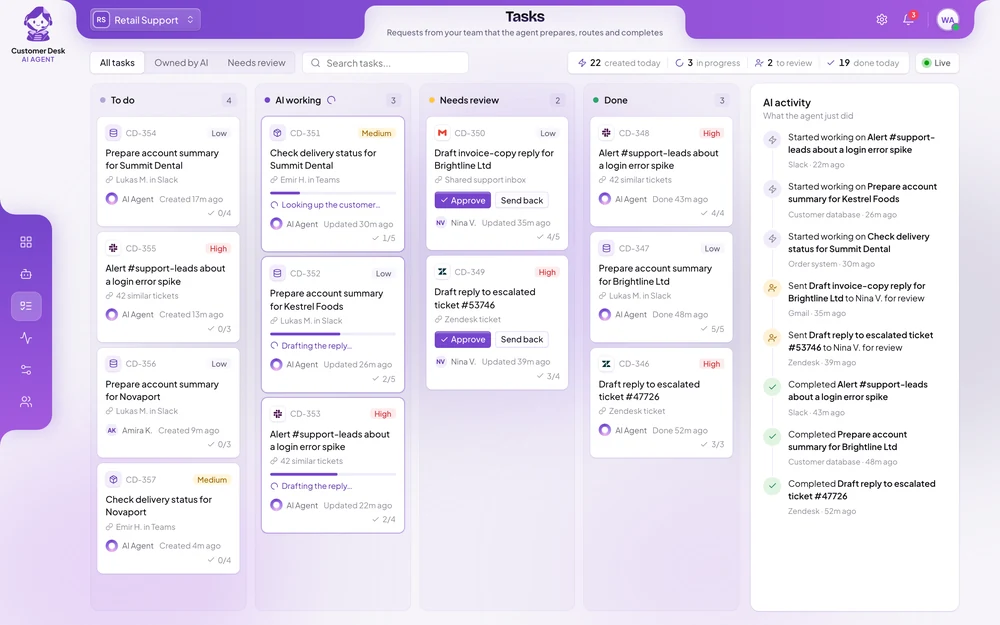
Requests are sorted the moment they arrive. Billing, developers, the warehouse or sales each receive only what is theirs, with the details already gathered.
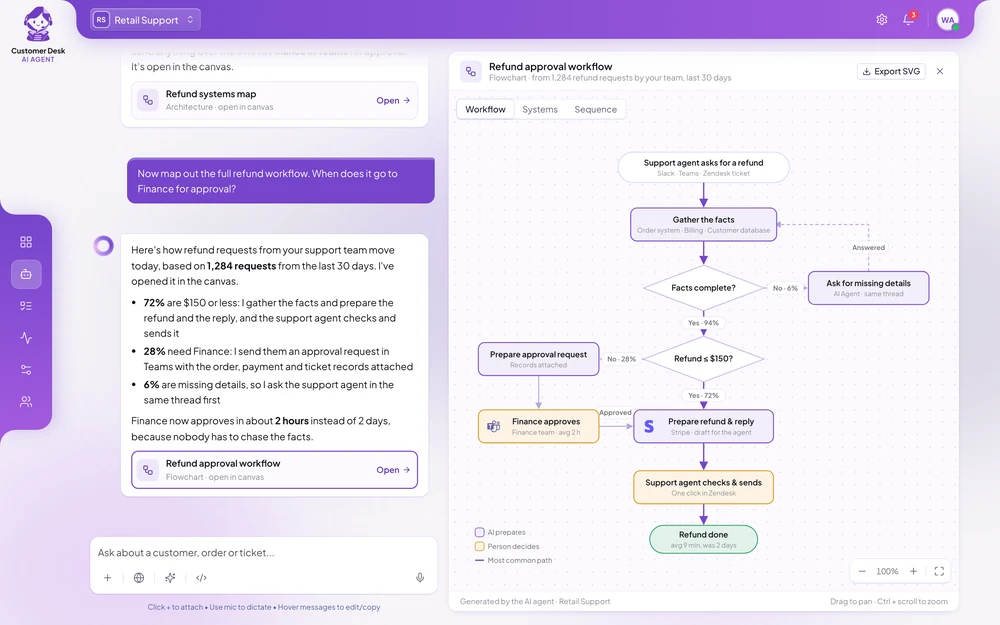
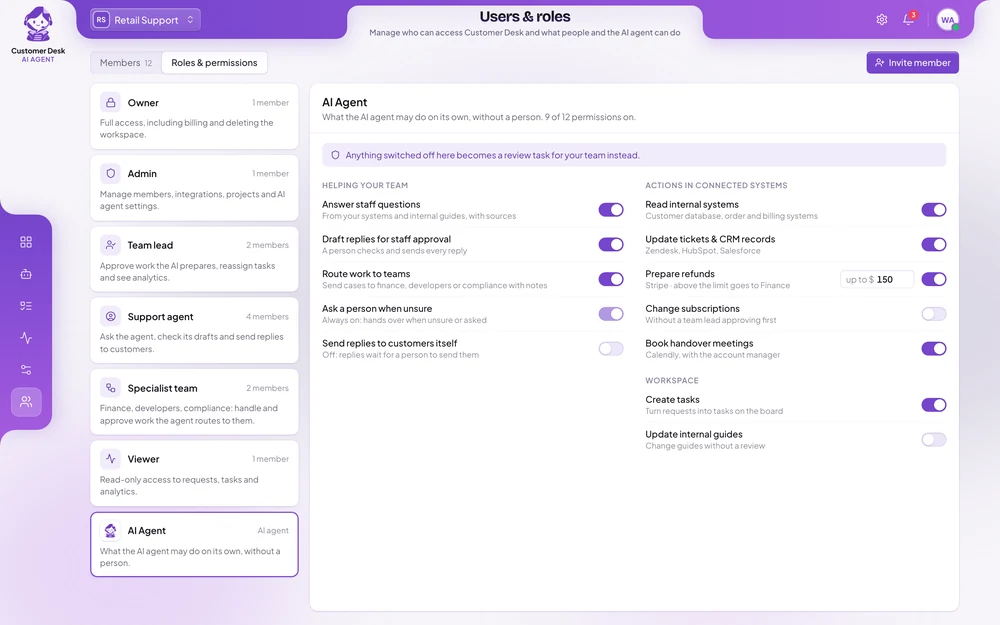
Refunds, replacements and exceptions follow your rules and limits. Anything above them waits for an employee to approve.
Managers see volumes, response times and what the agent handled, team by team, so they can plan staffing and spot problems early.
A support employee asks one question. The agent looks up the order and the customer, prepares a replacement and a refund, and waits for approval. The employee checks it and approves with one click.
Support team memberA customer says order #48213 arrived damaged. What can we do?
Customer DeskOrder #48213 shipped on 3 November and is within the 30-day return window. I opened a replacement request for the warehouse in Jira and prepared an €89 refund in Stripe. It is waiting for your approval.
Each one in short: the problem, the results, and how the agent handles the work.
To look into one account, a support engineer checked the account's plan and users, asked the data team for a usage query or ran it themselves, searched the error logs, read the latest GitHub releases and looked for known issues in Notion.
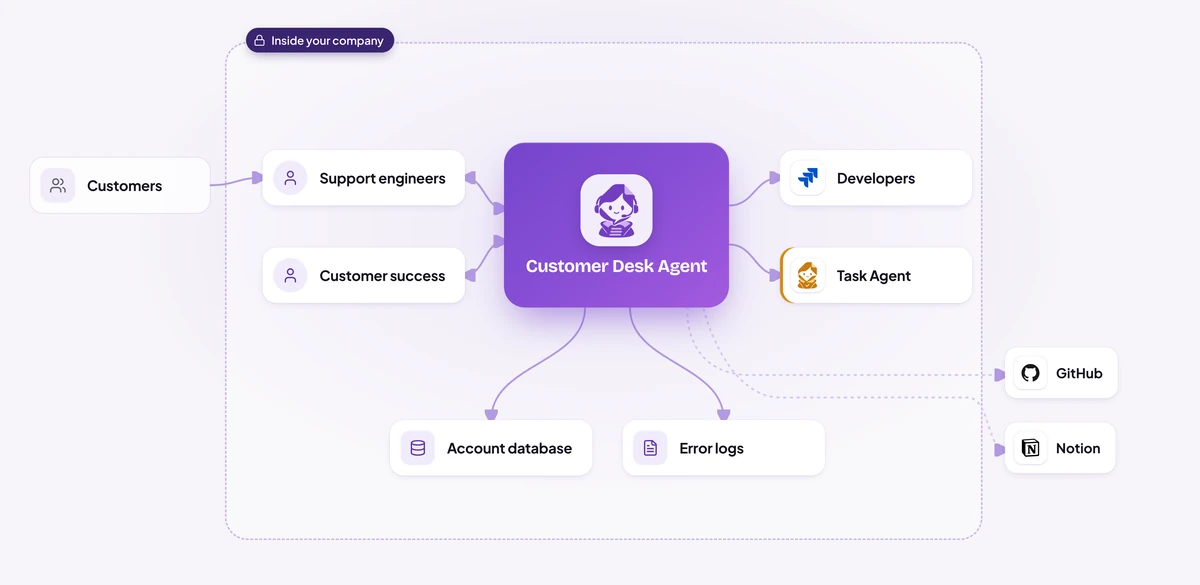
A support engineer or customer success manager asks about an account in plain words, in a Slack channel or from inside the Intercom conversation.
It reads the account's plan, users and recent activity from the internal database and the matching errors from the product logs, then lines them up with GitHub releases and the known-issues page in Notion.
It checks Jira for an existing report first.
A reply in the company's tone waits in Intercom for the support engineer to check, edit and send.
On peak-season Monday mornings, team leads spent the first hour sorting thousands of weekend tickets by hand.
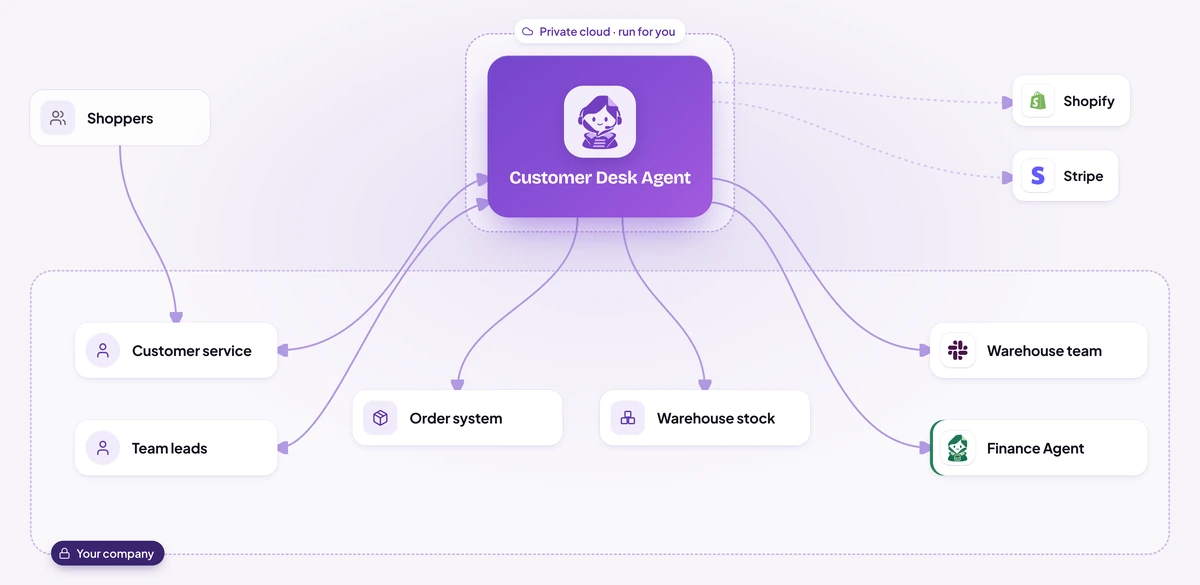
The agent reads every new ticket as it arrives, puts it in the right queue, merges duplicates and flags urgent ones.
At the top of every ticket the team sees what the order system, warehouse stock, Shopify and Stripe say about this customer and order, so nobody has to open four systems.
Following the retailer's rules and tone, the agent drafts the reply, reserves a replacement size or adds a return label where that fits.
Refunds above €150 go to finance in Microsoft Teams (or Slack) with the order, payment, damage photos and customer history attached.
Preparing a single card dispute took a contact-centre employee about 12 minutes: finding the payments, checking the card, locating the customer's signed form and looking up the filing deadline.
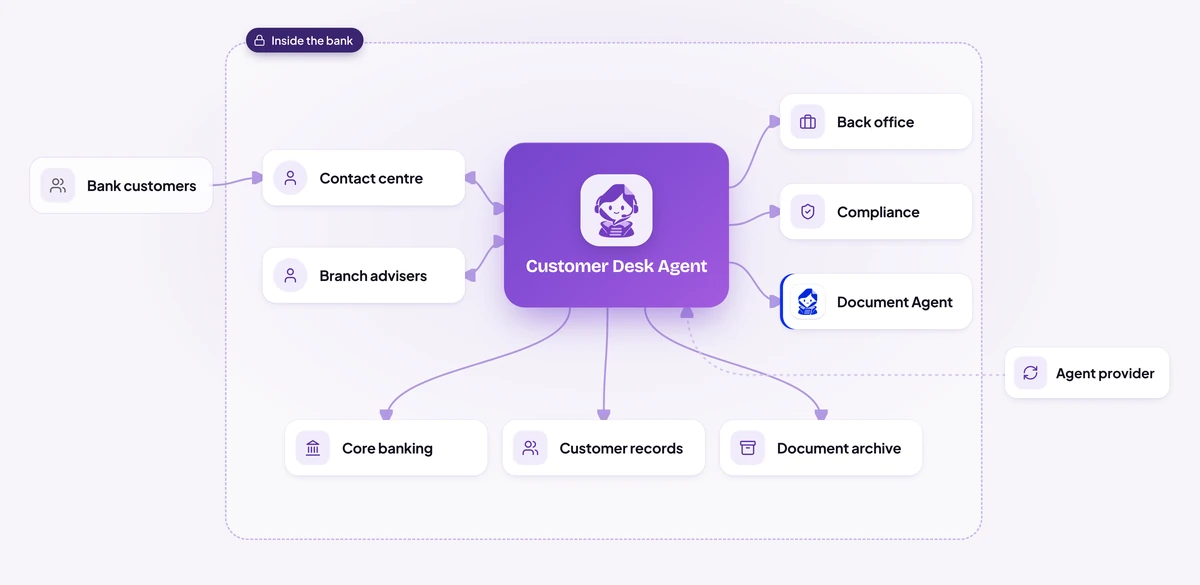
Every question comes from a signed-in employee, and their role decides what the agent may show.
For Sara's dispute it finds the three payments in core banking, confirms the customer and card in the customer records, attaches the signed form from the document archive and takes the filing deadline from the bank's procedures.
The temporary credit goes to compliance in Microsoft Teams with the file attached, and nothing happens until someone approves it.
Sara gets a short summary of what was done and a draft message for the customer.
During an outage, every support employee worked through the same ticket again and again, writing replies from scratch and asking colleagues in chat whether something bigger was going on.
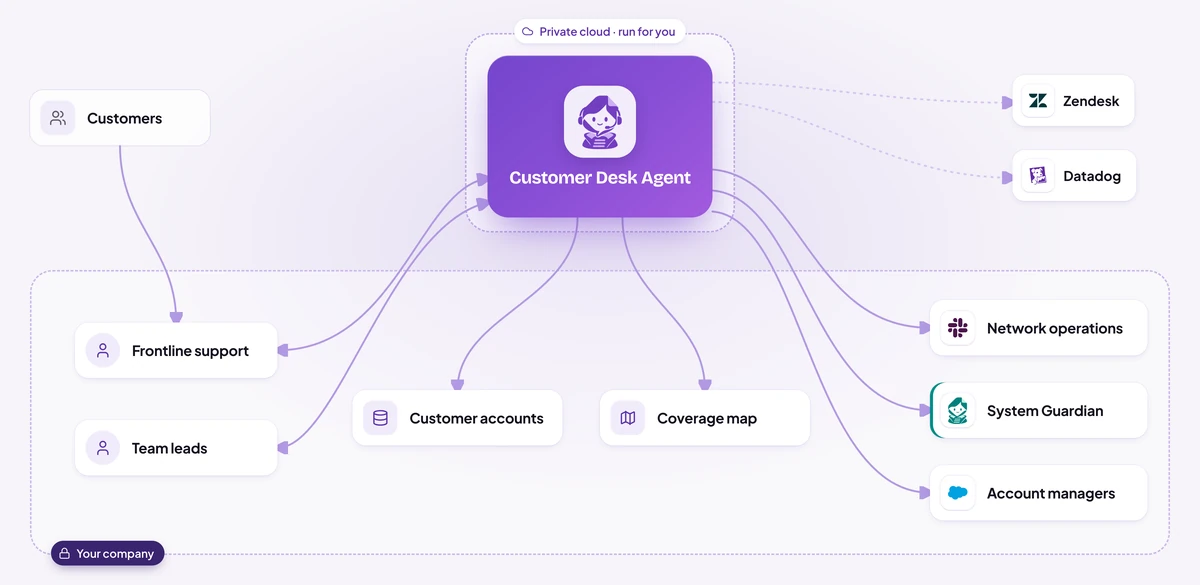
The agent notices tickets about the same problem from the same area arriving within minutes, and links them into one incident in Zendesk instead of leaving 214 separate tickets.
It compares the tickets with network health in Datadog to confirm a real outage, and finds which customer accounts sit in the area, including the business customers.
The network team gets a single Slack alert with the area, start time, the mast that went offline and how many accounts are affected.
Every linked ticket gets the current status and a draft reply that the employee checks and sends.
A single referral meant copying patient details from the admin records, finding the follow-up slot in the appointment system, retyping the reason from the doctor's note and checking the insurance policy.
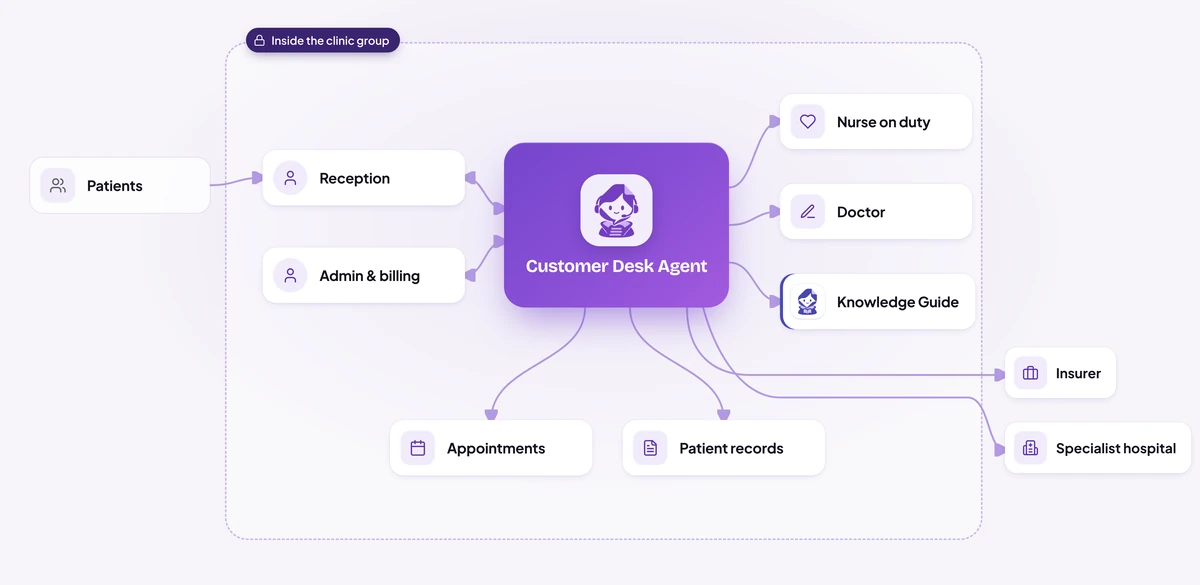
A receptionist asks in Teams, or an insurer writes to the shared inbox.
It joins the patient admin records, the appointment system and the doctor's note, and checks what the patient's insurer needs before a scan or a specialist visit.
Referral letters, pre-approval requests and replies to insurers arrive as drafts, with every line showing where it came from.
A question about symptoms, medication or treatment goes straight to the nurse on duty in Teams, with the record attached.
Dispatchers started each morning by searching for the previous day's exceptions.
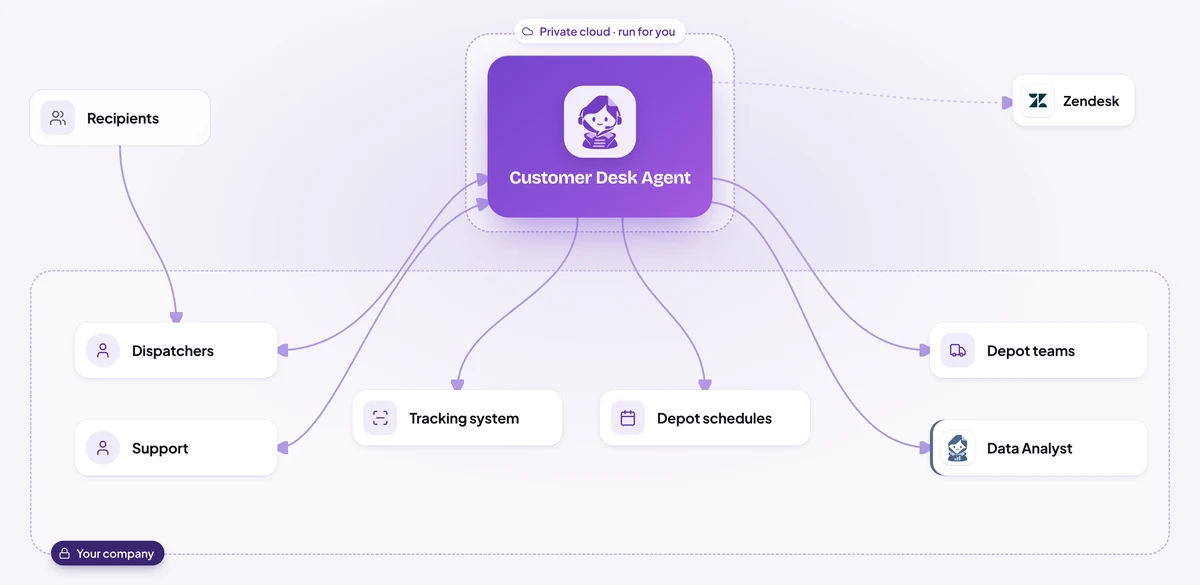
When a driver scans a failed delivery or reports damage, or a dispatcher asks in Slack, the agent opens a case straight away.
It joins the scan history and photos from the tracking system, the driver's notes in Slack, the sender's account and the next free slot in the depot schedule.
Damaged parcels go to the depot's Slack channel, failed deliveries to dispatch and wrong addresses to the address desk in Zendesk, with a suggested next step for staff to confirm.
A draft customer update waits in Zendesk for a support agent to check and send.
Illustrative scenarios with unnamed companies. The figures show the kind of improvement each setup is designed to deliver; actual results depend on volume, the systems connected and how the agent is configured.
We set up the Customer Desk AI Agent around how your support team works today.
Week 1
We sit with the people who do the work, map the process step by step and find the systems that hold the information. You get a written plan before anything is built.
Weeks 2 to 3
We build and configure the agent around your process: your rules, your approvals, your wording, and connections to your databases and the tools your teams use.
Weeks 3 to 4
We install it inside your infrastructure, or in our cloud if you prefer, and test it with your team on real requests until the results meet the standard you set.
From week 5
We train your employees and administrators, hand over the controls and stay with you: monthly reviews, updates you approve, and the next process when you are ready.
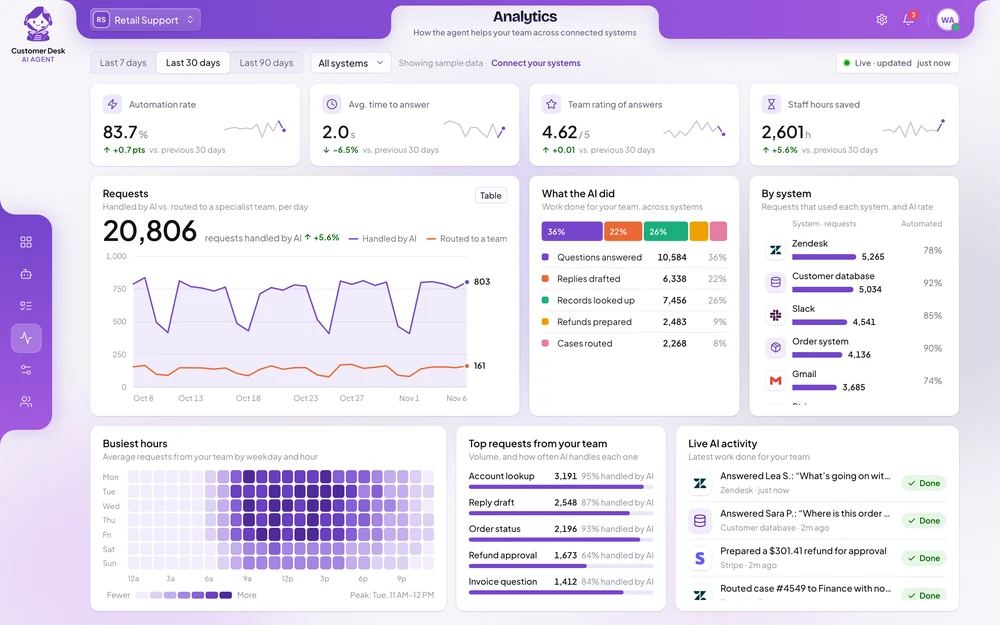
Your team tests the agent on real requests within the first weeks. Most companies see the share of routine requests it answers, and the time saved, during the first month after going live.
It depends on your request volume, the systems it connects to and where it runs. After a first conversation you get a written proposal with the price, so you can compare it with what the work costs you today.
It takes over the repetitive part of the work, so the same team can handle more requests and spend its time on the customers who need a person. Decisions, exceptions and sensitive conversations stay with your people.
It answers only from your own systems and documents, follows the limits you set, and passes anything it is unsure about to a person. Every answer and action is recorded, so you can review and correct it.
Yes. You decide which questions it answers alone, which actions it may take and up to what amount, and how it should sound. You can pause it at any time.
It can run on your own servers, where every conversation and customer record stays inside your company and we have no access to it. Your data is never used to train AI models.
No. It works with Zendesk, Intercom, Salesforce, Microsoft Teams, Slack and the other tools your team already uses.
Chat, email, messaging apps such as WhatsApp, Messenger and Telegram, and text messages. The agent works in writing only.
One person who knows how support works today, access to test versions of the systems involved, and a few hours a week from the team while we test.
Yes. Most companies start with one channel or one team, see the results, and then extend the agent to the rest of support.
Tell us how many requests your team handles, where they come from and what slows it down. You get a written proposal with the expected results, the setup, a timeline and a price.